Finance APIs — page 2
196 finance APIs for stocks, banking, tax and market data, best documented first.
Finnhub
FinanceReal-Time RESTful APIs and Websocket for Stocks, Currencies, and Crypto
Twelve Data
FinanceStock market data (real-time & historical)

bunq API
Finance***UPDATE:*** *We have released a [beta version of the new bunq API documentation.](https://beta.doc.bunq.com)* ***NOTICE:*** *We have updated the sandbox base url to `https://public-api.sandbox.bunq.com/v1/`. Please update your applications accordingly. Check here: <https://github.com/bunq/sdk_php/issues/149> for more info.* ***PSD2 NOTICE:*** *The second Payment Services Directive (PSD2) may affect your current or planned usage of our public API, as some of the API services are now subject to a permit. Please be aware that using our public API without the required PSD2 permit is at your own risk and take notice of our updated API Terms and Conditions on <https://www.bunq.com> for more information.* # <span id="topic-introduction">Introduction</span> Welcome to bunq! - The bunq API is organised around REST. JSON will be returned in almost all responses from the API, including errors but excluding binary (image) files. - Please configure your implementation to send its API requests to `https://public-api.sandbox.bunq.com/v1/` - There is a version of the [Android app](https://appstore.bunq.com/api/android/builds/bunq-android-sandbox-master.apk) that connects to the bunq Sandbox environment. To create accounts for the Sandbox app, please follow the steps in the [Android Emulator](#android-emulator) section. ## <span id="topic-introduction-get-started">Getting started</span> Before you start sending API requests, you need to get an API key and activate it. API activation happens when you install the API key and link your IP address and device to it *(create an API context)*. The steps below will guide you through what you need to do to start sending custom API requests. Here is an overview of what you can use to get started with the bunq API: 1. **Create an API key.** You can do it either in our [developer portal](https://developer.bunq.com) or in the bunq app *(Profile → Security & Settings → Developers → API keys)*. If you want to test our sandbox first, our [bunq Developer ](https://developer.bunq.com)is the best place to start. 2. **Register a device.** A device can be a phone (private), computer or a server (public). You can register a new device by using the `POST /installation` and `POST /device-server` calls. This will activate your API key. You only need to do this once. 3. **Open a session.** Sessions are temporary and expire after the auto-logout time set for the user account. It can be changed by the account owner in the bunq app. 4. **Make your first call!** 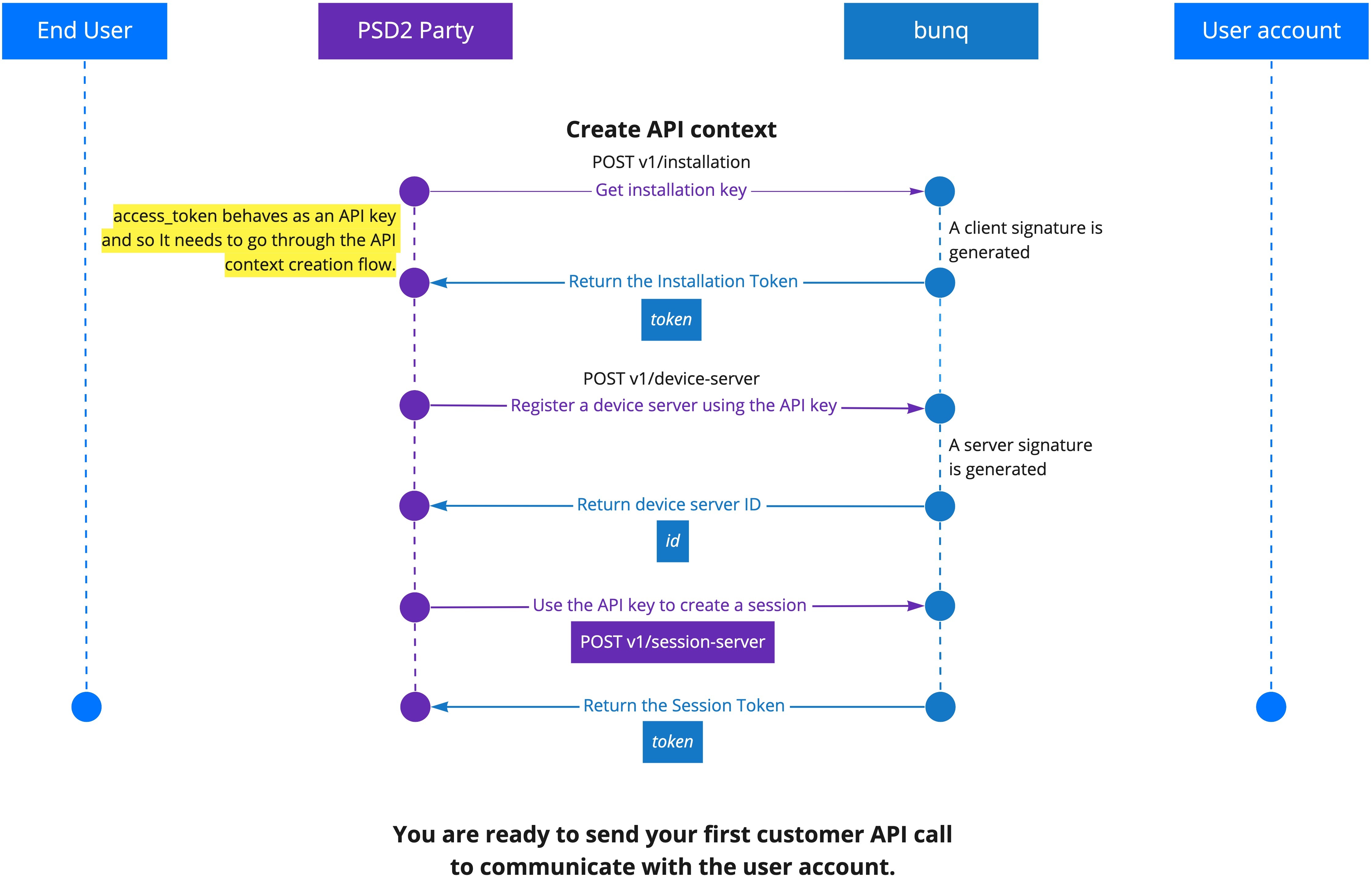 ## <span id="topic-introduction-versioning">Versioning</span> Developments in the financial sector, changing regulatory regimes and new feature requests require us to be flexible. This means we can iterate quickly to improve the API and related tooling. Therefore, we have chosen not to attach any version numbers to the changes just yet. We will inform you in a timely manner of any important changes we make before they are deployed on together.bunq.com. You can also [subscribe to our API newsletter](https://bunq.us8.list-manage.com/subscribe?u=c00d0d6daea4e1cf7c863d52e&id=b08680cdc7) to make sure you don't miss any important updates. # <span id="topic-oauth">OAuth</span> ## <span id="topic-oauth-what-is-oauth">What is OAuth?</span> [OAuth 2.0](https://www.oauth.com/oauth2-servers/getting-ready/) is a protocol that will let your app connect to bunq users in a safe and easy way. Please be aware that if you will gain access to the account information of other bunq users or initiate a payment for them, [you may require a PSD2 permit](https://beta.doc.bunq.com/other/faq#can-we-use-the-bunq-api-to-offer-services-to-third-parties). ## <span id="topic-oauth-get-started-with-oauth-for-bunq">Get started with OAuth for bunq</span> To initiate authorization into the bunq user accounts, you need to create an OAuth Client and register at least 1 redirect URL for it. You can have 1 OAuth Client at a

Branch Locator API
FinanceHSBC, one of the largest banking and financial services institutions in the world, serves millions of customers through its four global businesses.

IBKR 3rd Party Web API
FinanceInteractive Brokers Web API for 3rd Party Companies

OpenFIGI
FinanceEquity, index, futures, options symbology from Bloomberg LP
Xero Bank Feeds API
FinanceThe Bank Feeds API is a closed API that is only available to financial institutions that have an established financial services partnership with Xero. If you're an existing financial services partner that wants access, contact your local Partner Manager. If you're a financial institution who wants to provide bank feeds to your business customers, contact us to become a financial services partner.
Alpha Vantage
FinanceRealtime and historical stock data
Tradier
FinanceUS equity/option market data (delayed, intraday, historical)

Portfolio Optimizer
FinancePortfolio analysis and optimization
Product Finder API
FinanceHSBC, one of the largest banking and financial services institutions in the world, serves millions of customers through its four global businesses.

Business Registries
Finance# Introduction The Business Registries API is built on HTTP. The API is RESTful. It has predictable resource URIs. The API is documented in <a target="_blank" href="https://github.com/OAI/OpenAPI-Specification">OpenAPI</a> format. In addition to the standard OpenAPI syntax we use a few <a target="_blank" href="https://github.com/Rebilly/ReDoc/blob/master/docs/redoc-vendor-extensions.md">vendor extensions</a>. # Overview The following sections describe the resources that make up the Business Registries REST API. ## Current Version By default, all requests to https://api.abr.ato.gov.au receive the `v1` version of the REST API. We encourage you to explicitly request this version via the `Accept` header. Accept: application/vnd.abr-ato.v1+json ## Schema All API access is over HTTPS, and accessed from https://api.abr.ato.gov.au. All data is sent and received as JSON. Blank fields are included. All dates use the [ISO 8601](https://en.wikipedia.org/wiki/ISO_8601) format: YYYY-MM-DD For example: `2017-07-01` (the 1st of July 2017) All timestamps use the [ISO 8601](https://en.wikipedia.org/wiki/ISO_8601) format: YYYY-MM-DDTHH:MM:SSZ For example: `2017-07-01T11:05:06+10:00` ## Timezones Some requests allow for specifying timestamps or generate timestamps with time zone information. We apply the following rules, in order of priority, to determine timezone information for API calls. ### Explicitly provide an ISO 8601 timestamp with timezone information For API calls that allow for a timestamp to be specified, we use that exact timestamp. For example: `2017-07-01T11:05:06+10:00` ## Pagination Information about pagination is provided in the [Link](https://tools.ietf.org/html/rfc5988#page-6) header. For example: Link: <https://api.abr.ato.gov.au/individuals?page=2>; rel="next", <https://api.abr.ato.gov.au/individuals?page=34>; rel="last" `rel="next"` states that the next page is `page=2`. This makes sense, since by default, all paginated queries start at page `1`. `rel="last"` provides some more information, stating that the last page of results is on `page 34`. Accordingly, we have 33 more pages of information that we can consume. ## Parameters Many API methods take optional parameters: GET /individuals/1234/addresses/?addressType='Mailing' In this example, the '1234' value is provided for the `:partyId` parameter in the path while `:addressType` is passed in the query string. For POST, PATCH, PUT, and DELETE requests, parameters not included in the URL should be encoded as JSON with a Content-Type of 'application/json'. ## Metadata The API provides **metadata services** that you can use to discover information about the classifcation schemes and values used by the Registry. For example: GET /classifications/roles Sample response: [ { "id": "123e4567-e89b-12d3-a456-426655440001", "role": "Director", "roleDescription": "An individual responsible for managing a company's ...", "relationship": "Directorship", "reciprocalRole": "Company", "reciprocalRoleDescription": "An incorporated legal entity." }, { ... } ] ## Root Endpoint You can issue a GET request to the root endpoint (also known as the service root) to get all the endpoint categories that the REST API supports: curl https://api.abr.ato.gov.au ## Authentication The Business Registries API supports API Key authentication. When you sign up for an account, you are given your first API key. You can generate additional API keys, and delete API keys (as you may need to rotate your keys in the future). You authenticate to the Business Registries API by providing your secret key in the request header. **Note:** Some requests will return `404 Not Found`, instead of `403 Permission Denied`. This is to prevent the accidental leakage of information to unauthorised users.

NOWPayments API
FinanceNOWPayments is a non-custodial cryptocurrency payment processing platform. Accept payments in a wide range of cryptos and get them instantly converted into a coin of your choice and sent to your wallet. Keeping it simple – no excess. # Sandbox Before production usage, you can test our API using the Sandbox. Details can be found [here](https://documenter.getpostman.com/view/7907941/T1LSCRHC) # Authentication To use the NOWPayments API you should do the following: * Sign up at [nowpayments.io](https://nowpayments.io) * Specify your outcome wallet * Generate an API key # Standard e-commerce flow for NOWPayments API: 1. API - Check API availability with the ["GET API status"](https://documenter.getpostman.com/view/7907941/S1a32n38?version=latest#9998079f-dcc8-4e07-9ac7-3d52f0fd733a) method. If required, check the list of available payment currencies with the ["GET available currencies"](https://documenter.getpostman.com/view/7907941/S1a32n38?version=latest#1c268f89-4fe7-471e-81b4-5a3153577b73) method. 2. UI - Ask a customer to select item/items for purchase to determine the total sum; 3. UI - Ask a customer to select payment currency 4. API - Get the minimum payment amount for the selected currency pair (payment currency to your Outcome Wallet currency) with the ["GET Minimum payment amount"](https://documenter.getpostman.com/view/7907941/S1a32n38?version=latest#41b02221-2d58-4fcf-9529-59d3763d6434) method; 5. API - Get the estimate of the total amount in crypto with ["GET Estimated price"](https://documenter.getpostman.com/view/7907941/S1a32n38?version=latest#7025cacf-7040-4c7b-a83f-f9ff0a22a822) and check that it is larger than the minimum payment amount from step 4; 6. API - Call the ["POST Create payment"](https://documenter.getpostman.com/view/7907941/S1a32n38?version=latest#5e37f3ad-0fa1-4292-af51-5c7f95730486) method to create a payment and get the deposit address (in our example, the generated BTC wallet address is returned from this method); 7. UI - Ask a customer to send the payment to the generated deposit address (in our example, user has to send BTC coins); 8. UI - A customer sends coins, NOWPayments processes and exchanges them (if required), and settles the payment to your Outcome Wallet (in our example, to your ETH address); 9. API - You can get the payment status either via our IPN callbacks or manually, using ["GET Payment Status"](https://documenter.getpostman.com/view/7907941/S1a32n38?version=latest#0b77a8e3-2344-4760-a0bd-247da067db6d) and display it to a customer so that they know when their payment has been processed. 10. API - you call the list of payments made to your account via the ["GET List of payments"](https://documenter.getpostman.com/view/7907941/S1a32n38?version=latest#c8399c0e-d798-4f01-83ae-ddaa6905c2da) method. Additionally, you can see all of this information in your [Account](https://account.nowpayments.io/payments) on NOWPayments website. ## Alternative flow 1. API - Check API availability with the ["GET API status"](https://documenter.getpostman.com/view/7907941/S1a32n38?version=latest#9998079f-dcc8-4e07-9ac7-3d52f0fd733a) method. If required, check the list of available payment currencies with the ["GET available currencies"](https://documenter.getpostman.com/view/7907941/S1a32n38?version=latest#1c268f89-4fe7-471e-81b4-5a3153577b73) method. 2. UI - Ask a customer to select item/items for purchase to determine the total sum; 3. UI - Ask a customer to select payment currency 4. API - Get the minimum payment amount for the selected currency pair (payment currency to your Outcome Wallet currency) with the ["GET Minimum payment amount"](https://documenter.getpostman.com/view/7907941/S1a32n38?version=latest#41b02221-2d58-4fcf-9529-59d3763d6434) method; 5. API - Get the estimate of the total amount in crypto with ["GET Estimated price"](https://documenter.getpostman.com/view/7907941/S1a32n38?version=latest#7025cacf-7040-4c7b-a83f-f9ff0a22a822) and check that it is larger than the minimum payment
Financial Modeling Prep
FinanceRealtime and historical stock data
Xero Files API
FinanceThese endpoints are specific to Xero Files API
Yodlee Core APIs
FinanceThis file describes the Yodlee Platform APIs using the swagger notation. You can use this swagger file to generate client side SDKs to the Yodlee Platform APIs for many different programming languages. Yodlee supports the Java SDK and it is available <a href="https://developer.yodlee.com/java-sdk-overview ">here</a>. You can generate a client SDK for Python, Java, JavaScript, PHP or other languages according to your development needs. For more details about the APIs, refer to <a href="https://developer.yodlee.com/docs/api/1.1/Overview">Yodlee API v1.1 - Overview</a>.
SmartAPI
FinanceGain access to set of <SmartAPI> and create end-to-end broking services

Accounting API
FinanceA flexible API for pulling accounting data, normalized and aggregated from 20 accounting integrations. Standardize how you connect to your customers’ accounting software. View, create, update, and delete data in the same way for all the leading accounting platforms. [Read more...](https://docs.codat.io/accounting-api/overview) [See our OpenAPI spec](https://github.com/codatio/oas)
Binlist
FinancePublic access to a database of IIN/BIN information
EOD Historical Data
FinanceReal-time and historical stock market data with 150+ exchanges

Open Data API
FinanceLatest Swagger specification for OpenData
Xero OAuth 2 Identity Service API
FinanceThese endpoints are related to managing authentication tokens and identity for Xero API
Intrinio
FinanceA wide selection of financial data feeds
Moov
FinanceThe Moov API makes it simple for platforms to send, receive, and store money