 Open documentation ↗
Overview
***UPDATE:*** *We have released a [beta version of the new bunq API documentation.](https://beta.doc.bunq.com)* ***NOTICE:*** *We have updated the sandbox base url to `https://public-api.sandbox.bunq.com/v1/`. Please update your applications accordingly. Check here: <https://github.com/bunq/sdk_php/issues/149> for more info.* ***PSD2 NOTICE:*** *The second Payment Services Directive (PSD2) may affect your current or planned usage of our public API, as some of the API services are now subject to a permit. Please be aware that using our public API without the required PSD2 permit is at your own risk and take notice of our updated API Terms and Conditions on <https://www.bunq.com> for more information.* # <span id="topic-introduction">Introduction</span> Welcome to bunq! - The bunq API is organised around REST. JSON will be returned in almost all responses from the API, including errors but excluding binary (image) files. - Please configure your implementation to send its API requests to `https://public-api.sandbox.bunq.com/v1/` - There is a version of the [Android app](https://appstore.bunq.com/api/android/builds/bunq-android-sandbox-master.apk) that connects to the bunq Sandbox environment. To create accounts for the Sandbox app, please follow the steps in the [Android Emulator](#android-emulator) section. ## <span id="topic-introduction-get-started">Getting started</span> Before you start sending API requests, you need to get an API key and activate it. API activation happens when you install the API key and link your IP address and device to it *(create an API context)*. The steps below will guide you through what you need to do to start sending custom API requests. Here is an overview of what you can use to get started with the bunq API: 1. **Create an API key.** You can do it either in our [developer portal](https://developer.bunq.com) or in the bunq app *(Profile → Security & Settings → Developers → API keys)*. If you want to test our sandbox first, our [bunq Developer ](https://developer.bunq.com)is the best place to start. 2. **Register a device.** A device can be a phone (private), computer or a server (public). You can register a new device by using the `POST /installation` and `POST /device-server` calls. This will activate your API key. You only need to do this once. 3. **Open a session.** Sessions are temporary and expire after the auto-logout time set for the user account. It can be changed by the account owner in the bunq app. 4. **Make your first call!** 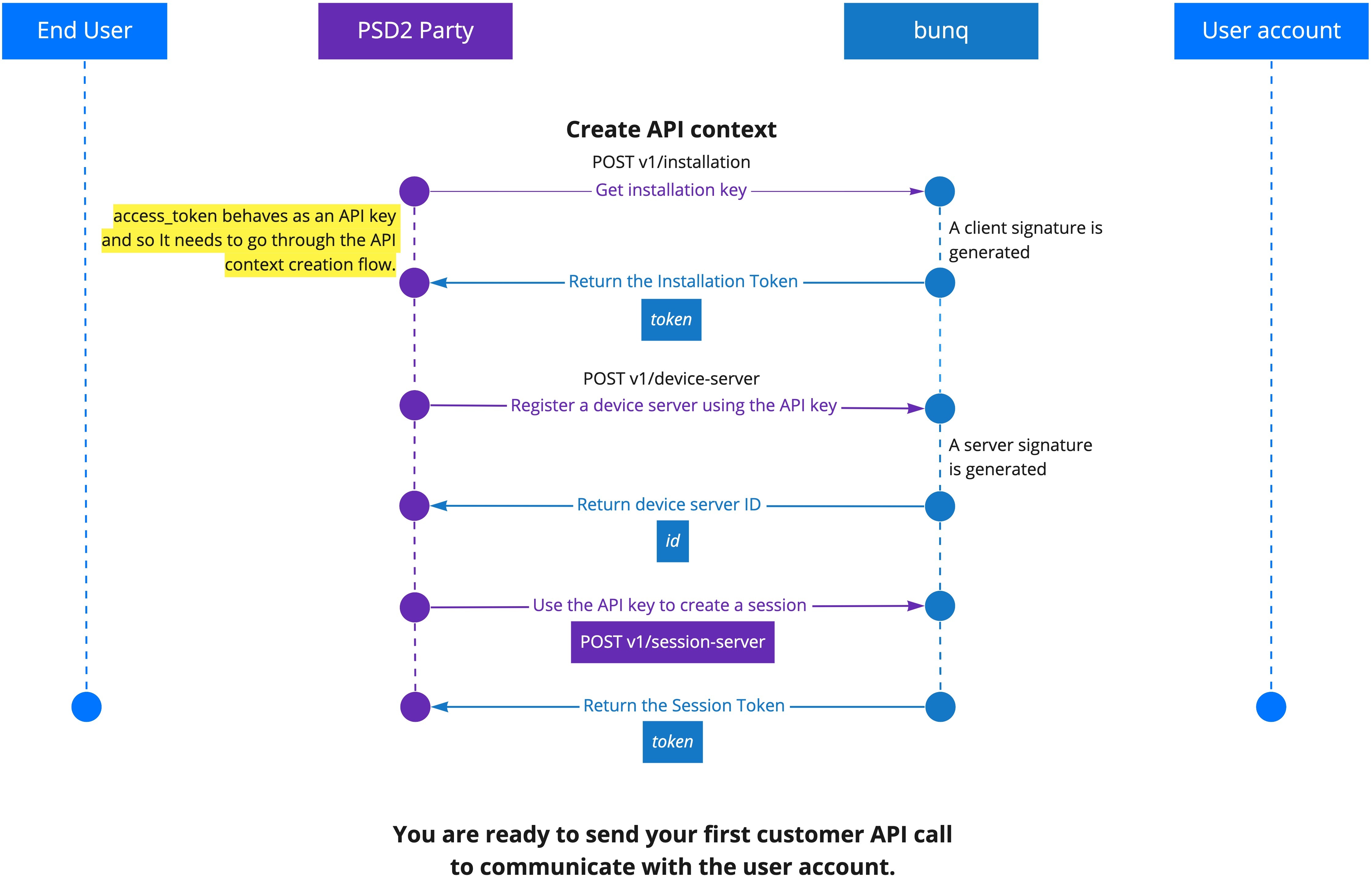 ## <span id="topic-introduction-versioning">Versioning</span> Developments in the financial sector, changing regulatory regimes and new feature requests require us to be flexible. This means we can iterate quickly to improve the API and related tooling. Therefore, we have chosen not to attach any version numbers to the changes just yet. We will inform you in a timely manner of any important changes we make before they are deployed on together.bunq.com. You can also [subscribe to our API newsletter](https://bunq.us8.list-manage.com/subscribe?u=c00d0d6daea4e1cf7c863d52e&id=b08680cdc7) to make sure you don't miss any important updates. # <span id="topic-oauth">OAuth</span> ## <span id="topic-oauth-what-is-oauth">What is OAuth?</span> [OAuth 2.0](https://www.oauth.com/oauth2-servers/getting-ready/) is a protocol that will let your app connect to bunq users in a safe and easy way. Please be aware that if you will gain access to the account information of other bunq users or initiate a payment for them, [you may require a PSD2 permit](https://beta.doc.bunq.com/other/faq#can-we-use-the-bunq-api-to-offer-services-to-third-parties). ## <span id="topic-oauth-get-started-with-oauth-for-bunq">Get started with OAuth for bunq</span> To initiate authorization into the bunq user accounts, you need to create an OAuth Client and register at least 1 redirect URL for it. You can have 1 OAuth Client at a
bunq API is a finance API from bunq.com. It needs no API key. It is served over plain HTTP. Its OpenAPI description documents 421 endpoints.
At a glance
- Authentication
- No auth
- HTTPS
- No
- CORS
- Unknown
- Category
- Finance
- Version
- 1.0
- Endpoints
- 421
- OpenAPI
- Specification ↗
- Spec updated
- 2023-03-06
Endpoints
| Method | Path | What it does |
|---|---|---|
| POST | /attachment-public | Create a new public attachment. Create a POST request with a payload that contains a binary representation of the file, without any JSON wrapping. Make sure you |
| GET | /attachment-public/{attachment-publicUUID}/content | Get the raw content of a specific attachment. |
| GET | /attachment-public/{itemId} | Get a specific attachment's metadata through its UUID. The Content-Type header of the response will describe the MIME type of the attachment file. |
| POST | /avatar | Avatars are public images used to represent you or your company. Avatars are used to represent users, monetary accounts and cash registers. Avatars cannot be de |
| GET | /avatar/{itemId} | Avatars are public images used to represent you or your company. Avatars are used to represent users, monetary accounts and cash registers. Avatars cannot be de |
| GET | /device | Get a collection of Devices. A Device is either a DevicePhone or a DeviceServer. |
| GET | /device-server | Get a collection of all the DeviceServers you have created. |
| POST | /device-server | Create a new DeviceServer providing the installation token in the header and signing the request with the private part of the key you used to create the install |
| GET | /device-server/{itemId} | Get one of your DeviceServers. |
| GET | /device/{itemId} | Get a single Device. A Device is either a DevicePhone or a DeviceServer. |
| GET | /installation | You must have an active session to make this call. This call returns the Id of the the Installation you are using in your session. |
| POST | /installation | This is the only API call that does not require you to use the "X-Bunq-Client-Authentication" and "X-Bunq-Client-Signature" headers. |
| GET | /installation/{installationID}/server-public-key | Show the ServerPublicKey for this Installation. |
| GET | /installation/{itemId} | You must have an active session to make this call. This call is used to check whether the Id you provide is the Id of your current installation or not. |
| POST | /payment-service-provider-credential | Register a Payment Service Provider and provide credentials |
| GET | /payment-service-provider-credential/{itemId} | Register a Payment Service Provider and provide credentials |
| GET | /place-lookup/{place-lookupID}/photo/{photoID}/content | View endpoint for place opening periods. |
| POST | /sandbox-user-company | Used to create a sandbox userCompany. |
| POST | /sandbox-user-person | Used to create a sandbox userPerson. |
| POST | /server-error | An endpoint that will always throw an error. |
| POST | /session-server | Create a new session for a DeviceServer. Provide the Installation token in the "X-Bunq-Client-Authentication" header. And don't forget to create the "X-Bunq-Cli |
| DELETE | /session/{itemId} | Deletes the current session. |
| GET | /user | Get a collection of all available users. |
| GET | /user-company/{itemId} | Get a specific company. |
| PUT | /user-company/{itemId} | Modify a specific company's data. |
| GET | /user-company/{user-companyID}/name | Return all the known (trade) names for a specific user company. |
| GET | /user-payment-service-provider/{itemId} | Used to view UserPaymentServiceProvider for session creation. |
| GET | /user-person/{itemId} | Get a specific person. |
| PUT | /user-person/{itemId} | Modify a specific person object's data. |
| GET | /user/{itemId} | Get a specific user. |
| GET | /user/{userID}/attachment/{attachmentID}/content | Get the raw content of a specific attachment. |
| GET | /user/{userID}/attachment/{itemId} | Get a specific attachment. The header of the response contains the content-type of the attachment. |
| GET | /user/{userID}/billing-contract-subscription | Get all subscription billing contract for the authenticated user. |
| GET | /user/{userID}/bunqme-fundraiser-profile | bunq.me public profile of the user. |
| GET | /user/{userID}/bunqme-fundraiser-profile/{itemId} | bunq.me public profile of the user. |
| GET | /user/{userID}/card | Return all the cards available to the user. |
| POST | /user/{userID}/card-batch | Used to update multiple cards in a batch. |
| POST | /user/{userID}/card-batch-replace | Used to replace multiple cards in a batch. |
| POST | /user/{userID}/card-credit | Create a new credit card request. |
| POST | /user/{userID}/card-debit | Create a new debit card request. |
| GET | /user/{userID}/card-name | Return all the accepted card names for a specific user. |
| GET | /user/{userID}/card/{cardID}/export-statement-card | Used to create new and read existing card statement exports. Statement exports can be created in either CSV or PDF file format. |
| GET | /user/{userID}/card/{cardID}/export-statement-card-csv | Used to serialize ExportStatementCardCsv |
| POST | /user/{userID}/card/{cardID}/export-statement-card-csv | Used to serialize ExportStatementCardCsv |
| GET | /user/{userID}/card/{cardID}/export-statement-card-csv/{itemId} | Used to serialize ExportStatementCardCsv |
| DELETE | /user/{userID}/card/{cardID}/export-statement-card-csv/{itemId} | Used to serialize ExportStatementCardCsv |
| GET | /user/{userID}/card/{cardID}/export-statement-card-pdf | Used to serialize ExportStatementCardPdf |
| POST | /user/{userID}/card/{cardID}/export-statement-card-pdf | Used to serialize ExportStatementCardPdf |
| GET | /user/{userID}/card/{cardID}/export-statement-card-pdf/{itemId} | Used to serialize ExportStatementCardPdf |
| DELETE | /user/{userID}/card/{cardID}/export-statement-card-pdf/{itemId} | Used to serialize ExportStatementCardPdf |
| GET | /user/{userID}/card/{cardID}/export-statement-card/{export-statement-cardID}/content | Fetch the raw content of a card statement export. The returned file format could be CSV or PDF depending on the statement format specified during the statement |
| GET | /user/{userID}/card/{cardID}/export-statement-card/{itemId} | Used to create new and read existing card statement exports. Statement exports can be created in either CSV or PDF file format. |
| GET | /user/{userID}/card/{cardID}/generated-cvc2 | Get all generated CVC2 codes for a card. |
| POST | /user/{userID}/card/{cardID}/generated-cvc2 | Generate a new CVC2 code for a card. |
| GET | /user/{userID}/card/{cardID}/generated-cvc2/{itemId} | Get the details for a specific generated CVC2 code. |
| PUT | /user/{userID}/card/{cardID}/generated-cvc2/{itemId} | Endpoint for generating and retrieving a new CVC2 code. |
| POST | /user/{userID}/card/{cardID}/replace | Request a card replacement. |
| GET | /user/{userID}/card/{itemId} | Return the details of a specific card. |
| PUT | /user/{userID}/card/{itemId} | Update the card details. Allow to change pin code, status, limits, country permissions and the monetary account connected to the card. When the card has been re |
| GET | /user/{userID}/certificate-pinned | List all the pinned certificate chain for the given user. |
| POST | /user/{userID}/certificate-pinned | Pin the certificate chain. |
| GET | /user/{userID}/certificate-pinned/{itemId} | Get the pinned certificate chain with the specified ID. |
| DELETE | /user/{userID}/certificate-pinned/{itemId} | Remove the pinned certificate chain with the specific ID. |
| GET | /user/{userID}/challenge-request/{itemId} | Endpoint for apps to fetch a challenge request. |
| PUT | /user/{userID}/challenge-request/{itemId} | Endpoint for apps to fetch a challenge request. |
| GET | /user/{userID}/chat-conversation/{chat-conversationID}/attachment/{attachmentID}/content | Get the raw content of a specific attachment. |
| GET | /user/{userID}/company | Create and manage companies. |
| POST | /user/{userID}/company | Create and manage companies. |
| GET | /user/{userID}/company/{itemId} | Create and manage companies. |
| PUT | /user/{userID}/company/{itemId} | Create and manage companies. |
| POST | /user/{userID}/confirmation-of-funds | Used to confirm availability of funds on an account. |
| GET | /user/{userID}/credential-password-ip | Create a credential of a user for server authentication, or delete the credential of a user for server authentication. |
| GET | /user/{userID}/credential-password-ip/{credential-password-ipID}/ip | Manage the IPs which may be used for a credential of a user for server authentication. |
| POST | /user/{userID}/credential-password-ip/{credential-password-ipID}/ip | Manage the IPs which may be used for a credential of a user for server authentication. |
| GET | /user/{userID}/credential-password-ip/{credential-password-ipID}/ip/{itemId} | Manage the IPs which may be used for a credential of a user for server authentication. |
| PUT | /user/{userID}/credential-password-ip/{credential-password-ipID}/ip/{itemId} | Manage the IPs which may be used for a credential of a user for server authentication. |
| GET | /user/{userID}/credential-password-ip/{itemId} | Create a credential of a user for server authentication, or delete the credential of a user for server authentication. |
| GET | /user/{userID}/currency-cloud-beneficiary | Endpoint to manage CurrencyCloud beneficiaries. |
| POST | /user/{userID}/currency-cloud-beneficiary | Endpoint to manage CurrencyCloud beneficiaries. |
| GET | /user/{userID}/currency-cloud-beneficiary-requirement | Endpoint to list requirements for CurrencyCloud beneficiaries. |
| GET | /user/{userID}/currency-cloud-beneficiary/{itemId} | Endpoint to manage CurrencyCloud beneficiaries. |
| GET | /user/{userID}/event | Get a collection of events for a given user. You can add query the parameters monetary_account_id, status and/or display_user_event to filter the response. When |
| GET | /user/{userID}/event/{itemId} | Get a specific event for a given user. |
| GET | /user/{userID}/export-annual-overview | List all the annual overviews for a user. |
| POST | /user/{userID}/export-annual-overview | Create a new annual overview for a specific year. An overview can be generated only for a past year. |
| GET | /user/{userID}/export-annual-overview/{export-annual-overviewID}/content | Used to retrieve the raw content of an annual overview. |
| GET | /user/{userID}/export-annual-overview/{itemId} | Get an annual overview for a user by its id. |
| DELETE | /user/{userID}/export-annual-overview/{itemId} | Used to create new and read existing annual overviews of all the user's monetary accounts. Once created, annual overviews can be downloaded in PDF format via th |
| GET | /user/{userID}/feature-announcement/{itemId} | view for updating the feature display. |
| GET | /user/{userID}/insight-preference-date | Used to allow users to set insight/budget preferences. |
| GET | /user/{userID}/insights | Used to get insights about transactions between given time range. |
| GET | /user/{userID}/insights-search | Used to get events based on time and insight category. |
| GET | /user/{userID}/invoice | Used to list bunq invoices by user. |
| GET | /user/{userID}/invoice/{invoiceID}/pdf-content | Get a PDF export of an invoice. |
| GET | /user/{userID}/invoice/{itemId} | Used to list bunq invoices by user. |
| GET | /user/{userID}/legal-name | Endpoint for getting available legal names that can be used by the user. |
| GET | /user/{userID}/limit | Get all limits for the authenticated user. |
| GET | /user/{userID}/monetary-account | Get a collection of all your MonetaryAccounts. |
| GET | /user/{userID}/monetary-account-bank | Gets a listing of all MonetaryAccountBanks of a given user. |
| POST | /user/{userID}/monetary-account-bank | Create new MonetaryAccountBank. |
Showing the first 100 of 421 endpoints; the full list is in the documentation.
Questions
Does the bunq API API need an API key?
No. The bunq API API can be called without an API key or sign-up, which makes it handy for prototypes and front-end demos.
Does the bunq API API support HTTPS?
The bunq API API is listed as HTTP only, so avoid sending secrets to it.
How many endpoints does the bunq API API have?
Its OpenAPI description lists 421 endpoints in version 1.0. The first 100 are shown on this page.
What are alternatives to the bunq API API?
Other Finance APIs include Stripe, SEC EDGAR Data, Plaid, Fed Treasury, Razorpay IFSC.
Similar finance APIs
Compare alternatives →
Stripe
FinancePayment processing, subscriptions, and financial management
SEC EDGAR Data
FinanceAPI to access annual reports of public US companies

Plaid
FinanceConnect with user's bank accounts and access transaction data
Fed Treasury
FinanceU.S. Department of the Treasury Data
Razorpay IFSC
FinanceIndian Financial Systems Code (Bank Branch Codes)
Klarna
FinanceKlarna payment and shopping service
Listed from APIs.guru (CC0).