Development APIs — page 16
408 development APIs for developer tools, code hosting and utilities, best documented first.

File storage API
DevelopmentWelcome to the File Storage API. You can use this API to access all File Storage API endpoints. ## Base URL The base URL for all API requests is `https://unify.apideck.com` We also provide a [Mock API](https://developers.apideck.com/mock-api) that can be used for testing purposes: `https://mock-api.apideck.com` ## Headers Custom headers that are expected as part of the request. Note that [RFC7230](https://tools.ietf.org/html/rfc7230) states header names are case insensitive. | Name | Type | Required | Description | | --------------------- | ------- | -------- | -------------------------------------------------------------------------------------------------------------------------------------------------------------- | | x-apideck-consumer-id | String | Yes | The id of the customer stored inside Apideck Vault. This can be a user id, account id, device id or whatever entity that can have integration within your app. | | x-apideck-service-id | String | No | Describe the service you want to call (e.g., pipedrive). Only needed when a customer has activated multiple integrations for the same Unified API. | | x-apideck-raw | Boolean | No | Include raw response. Mostly used for debugging purposes. | | x-apideck-app-id | String | Yes | The application id of your Unify application. Available at https://app.apideck.com/unify/api-keys. | | Authorization | String | Yes | Bearer API KEY | ## Authorization You can interact with the API through the authorization methods below. <!-- ReDoc-Inject: <security-definitions> --> ## Pagination All API resources have support for bulk retrieval via list APIs. Apideck uses cursor-based pagination via the optional `cursor` and `limit` parameters. To fetch the first page of results, call the list API without a `cursor` parameter. Afterwards you can fetch subsequent pages by providing a cursor parameter. You will find the next cursor in the response body in `meta.cursors.next`. If `meta.cursors.next` is `null` you're at the end of the list. In the REST API you can also use the `links` from the response for added convenience. Simply call the URL in `links.next` to get the next page of results. ### Query Parameters | Name | Type | Required | Description | | ------ | ------ | -------- | ------------------------------------------------------------------------------------------------------------------ | | cursor | String | No | Cursor to start from. You can find cursors for next & previous pages in the meta.cursors property of the response. | | limit | Number | No | Number of results to return. Minimum 1, Maximum 200, Default 20 | ### Response Body | Name | Type | Description | | --------------------- | ------ | ------------------------------------------------------------------ | | meta.cursors.previous | String | Cursor to navigate to the previous page of results through the API | | meta.cursors.current | String | Cursor to navigate to the current page of results through the API | | meta.cursors.next | String | Cursor to navigate to the next page of results through the API | | meta.items_on_page | Number | Number of items returned in the data property of the response | | links.previous | String | Link to navigate to the previous page of results through the API | | links.current | String | Link to navigate to the current page of results through the API | | links.next | String | Link to navigate to the next page of results through the API | ⚠️ `meta.cursors.previous`/`links.previous` is not available for all connectors. ## SDKs and API Clients We currently offer a [Node.js](https://developers.apideck.com/sdks/node), [PHP](https://developers.apideck.com/sdks/php) and [.NET](https://developers.apideck.com/sdks/dot-net) SDK. Need another SDK? [Request the SDK of your choice](https://integrations.apideck.com/request). ## Debugging Because of the nature of the abstraction we do in Apideck Unify we still provide the option to the receive raw requests and responses being handled underlying. By including the raw flag `

Entity Search Client
DevelopmentThe Entity Search API lets you send a search query to Bing and get back search results that include entities and places. Place results include restaurants, hotel, or other local businesses. For places, the query can specify the name of the local business or it can ask for a list (for example, restaurants near me). Entity results include persons, places, or things. Place in this context is tourist attractions, states, countries, etc.
Interzoid Get Company Name Match Similarity Key API
DevelopmentThis API provides a similarity key used to match with other similar company name data, including for purposes of deduplication, fuzzy matching, or merging of datasets. A much higher match rate will be achieved by matching on the algorithmically generated similarity key rather than the data itself.
URL to Markdown
DevelopmentTurn any web page or PDF into clean Markdown for LLMs and RAG with one GET request. Free API for AI agents: no sign-up, no key.
HRIS API
DevelopmentWelcome to the HRIS API. You can use this API to access all HRIS API endpoints. ## Base URL The base URL for all API requests is `https://unify.apideck.com` We also provide a [Mock API](https://developers.apideck.com/mock-api) that can be used for testing purposes: `https://mock-api.apideck.com` ## Headers Custom headers that are expected as part of the request. Note that [RFC7230](https://tools.ietf.org/html/rfc7230) states header names are case insensitive. | Name | Type | Required | Description | | --------------------- | ------- | -------- | -------------------------------------------------------------------------------------------------------------------------------------------------------------- | | x-apideck-consumer-id | String | Yes | The id of the customer stored inside Apideck Vault. This can be a user id, account id, device id or whatever entity that can have integration within your app. | | x-apideck-service-id | String | No | Describe the service you want to call (e.g., pipedrive). Only needed when a customer has activated multiple integrations for the same Unified API. | | x-apideck-raw | Boolean | No | Include raw response. Mostly used for debugging purposes. | | x-apideck-app-id | String | Yes | The application id of your Unify application. Available at https://app.apideck.com/unify/api-keys. | | Authorization | String | Yes | Bearer API KEY | ## Authorization You can interact with the API through the authorization methods below. <!-- ReDoc-Inject: <security-definitions> --> ## Pagination All API resources have support for bulk retrieval via list APIs. Apideck uses cursor-based pagination via the optional `cursor` and `limit` parameters. To fetch the first page of results, call the list API without a `cursor` parameter. Afterwards you can fetch subsequent pages by providing a cursor parameter. You will find the next cursor in the response body in `meta.cursors.next`. If `meta.cursors.next` is `null` you're at the end of the list. In the REST API you can also use the `links` from the response for added convenience. Simply call the URL in `links.next` to get the next page of results. ### Query Parameters | Name | Type | Required | Description | | ------ | ------ | -------- | ------------------------------------------------------------------------------------------------------------------ | | cursor | String | No | Cursor to start from. You can find cursors for next & previous pages in the meta.cursors property of the response. | | limit | Number | No | Number of results to return. Minimum 1, Maximum 200, Default 20 | ### Response Body | Name | Type | Description | | --------------------- | ------ | ------------------------------------------------------------------ | | meta.cursors.previous | String | Cursor to navigate to the previous page of results through the API | | meta.cursors.current | String | Cursor to navigate to the current page of results through the API | | meta.cursors.next | String | Cursor to navigate to the next page of results through the API | | meta.items_on_page | Number | Number of items returned in the data property of the response | | links.previous | String | Link to navigate to the previous page of results through the API | | links.current | String | Link to navigate to the current page of results through the API | | links.next | String | Link to navigate to the next page of results through the API | ⚠️ `meta.cursors.previous`/`links.previous` is not available for all connectors. ## SDKs and API Clients We currently offer a [Node.js](https://developers.apideck.com/sdks/node), [PHP](https://developers.apideck.com/sdks/php) and [.NET](https://developers.apideck.com/sdks/dot-net) SDK. Need another SDK? [Request the SDK of your choice](https://integrations.apideck.com/request). ## Debugging Because of the nature of the abstraction we do in Apideck Unify we still provide the option to the receive raw requests and responses being handled underlying. By including the raw flag `?raw=true` in yo
Image Search Client
DevelopmentThe Image Search API lets you send a search query to Bing and get back a list of relevant images. This section provides technical details about the query parameters and headers that you use to request images and the JSON response objects that contain them. For examples that show how to make requests, see [Searching the Web for Images](https://docs.microsoft.com/azure/cognitive-services/bing-image-search/search-the-web).
Interzoid Get Country Match Similarity Key API
DevelopmentThis API provides a similarity key used to match with other similar country name data, including for purposes of deduplication, fuzzy matching, or merging of datasets. A much higher match rate will be achieved by matching on the algorithmically generated similarity key rather than the data itself.
Issue Tracking API
DevelopmentWelcome to the Issue Tracking API. You can use this API to access all Issue Tracking API endpoints. ## Base URL The base URL for all API requests is `https://unify.apideck.com` We also provide a [Mock API](https://developers.apideck.com/mock-api) that can be used for testing purposes: `https://mock-api.apideck.com` ## Headers Custom headers that are expected as part of the request. Note that [RFC7230](https://tools.ietf.org/html/rfc7230) states header names are case insensitive. | Name | Type | Required | Description | | --------------------- | ------- | -------- | -------------------------------------------------------------------------------------------------------------------------------------------------------------- | | x-apideck-consumer-id | String | Yes | The id of the customer stored inside Apideck Vault. This can be a user id, account id, device id or whatever entity that can have integration within your app. | | x-apideck-service-id | String | No | Describe the service you want to call (e.g., pipedrive). Only needed when a customer has activated multiple integrations for the same Unified API. | | x-apideck-raw | Boolean | No | Include raw response. Mostly used for debugging purposes. | | x-apideck-app-id | String | Yes | The application id of your Unify application. Available at https://app.apideck.com/unify/api-keys. | | Authorization | String | Yes | Bearer API KEY | ## Authorization You can interact with the API through the authorization methods below. <!-- ReDoc-Inject: <security-definitions> --> ## Pagination All API resources have support for bulk retrieval via list APIs. Apideck uses cursor-based pagination via the optional `cursor` and `limit` parameters. To fetch the first page of results, call the list API without a `cursor` parameter. Afterwards you can fetch subsequent pages by providing a cursor parameter. You will find the next cursor in the response body in `meta.cursors.next`. If `meta.cursors.next` is `null` you're at the end of the list. In the REST API you can also use the `links` from the response for added convenience. Simply call the URL in `links.next` to get the next page of results. ### Query Parameters | Name | Type | Required | Description | | ------ | ------ | -------- | ------------------------------------------------------------------------------------------------------------------ | | cursor | String | No | Cursor to start from. You can find cursors for next & previous pages in the meta.cursors property of the response. | | limit | Number | No | Number of results to return. Minimum 1, Maximum 200, Default 20 | ### Response Body | Name | Type | Description | | --------------------- | ------ | ------------------------------------------------------------------ | | meta.cursors.previous | String | Cursor to navigate to the previous page of results through the API | | meta.cursors.current | String | Cursor to navigate to the current page of results through the API | | meta.cursors.next | String | Cursor to navigate to the next page of results through the API | | meta.items_on_page | Number | Number of items returned in the data property of the response | | links.previous | String | Link to navigate to the previous page of results through the API | | links.current | String | Link to navigate to the current page of results through the API | | links.next | String | Link to navigate to the next page of results through the API | ⚠️ `meta.cursors.previous`/`links.previous` is not available for all connectors. ## SDKs and API Clients We currently offer a [Node.js](https://developers.apideck.com/sdks/node), [PHP](https://developers.apideck.com/sdks/php) and [.NET](https://developers.apideck.com/sdks/dot-net) SDK. Need another SDK? [Request the SDK of your choice](https://integrations.apideck.com/request). ## Debugging Because of the nature of the abstraction we do in Apideck Unify we still provide the option to the receive raw requests and responses being handled underlying. By including the raw fl
Local Search Client
DevelopmentThe Local Search client lets you send a search query to Bing and get back search results that include local businesses such as restaurants, hotels, retail stores, or other local businesses. The query can specify the name of the local business or it can ask for a list (for example, restaurants near me).
Interzoid Get Currency Rate API
DevelopmentThis API retrieves the latest currency exchange rate, against the US Dollar, for the given three-letter international currency code. These currency rates are compiled from many global sources and are updated several times per day.
Lead API
DevelopmentWelcome to the Lead API. You can use this API to access all Lead API endpoints. ## Base URL The base URL for all API requests is `https://unify.apideck.com` We also provide a [Mock API](https://developers.apideck.com/mock-api) that can be used for testing purposes: `https://mock-api.apideck.com` ## Headers Custom headers that are expected as part of the request. Note that [RFC7230](https://tools.ietf.org/html/rfc7230) states header names are case insensitive. | Name | Type | Required | Description | | --------------------- | ------- | -------- | -------------------------------------------------------------------------------------------------------------------------------------------------------------- | | x-apideck-consumer-id | String | Yes | The id of the customer stored inside Apideck Vault. This can be a user id, account id, device id or whatever entity that can have integration within your app. | | x-apideck-service-id | String | No | Describe the service you want to call (e.g., pipedrive). Only needed when a customer has activated multiple integrations for the same Unified API. | | x-apideck-raw | Boolean | No | Include raw response. Mostly used for debugging purposes. | | x-apideck-app-id | String | Yes | The application id of your Unify application. Available at https://app.apideck.com/unify/api-keys. | | Authorization | String | Yes | Bearer API KEY | ## Authorization You can interact with the API through the authorization methods below. <!-- ReDoc-Inject: <security-definitions> --> ## Pagination All API resources have support for bulk retrieval via list APIs. Apideck uses cursor-based pagination via the optional `cursor` and `limit` parameters. To fetch the first page of results, call the list API without a `cursor` parameter. Afterwards you can fetch subsequent pages by providing a cursor parameter. You will find the next cursor in the response body in `meta.cursors.next`. If `meta.cursors.next` is `null` you're at the end of the list. In the REST API you can also use the `links` from the response for added convenience. Simply call the URL in `links.next` to get the next page of results. ### Query Parameters | Name | Type | Required | Description | | ------ | ------ | -------- | ------------------------------------------------------------------------------------------------------------------ | | cursor | String | No | Cursor to start from. You can find cursors for next & previous pages in the meta.cursors property of the response. | | limit | Number | No | Number of results to return. Minimum 1, Maximum 200, Default 20 | ### Response Body | Name | Type | Description | | --------------------- | ------ | ------------------------------------------------------------------ | | meta.cursors.previous | String | Cursor to navigate to the previous page of results through the API | | meta.cursors.current | String | Cursor to navigate to the current page of results through the API | | meta.cursors.next | String | Cursor to navigate to the next page of results through the API | | meta.items_on_page | Number | Number of items returned in the data property of the response | | links.previous | String | Link to navigate to the previous page of results through the API | | links.current | String | Link to navigate to the current page of results through the API | | links.next | String | Link to navigate to the next page of results through the API | ⚠️ `meta.cursors.previous`/`links.previous` is not available for all connectors. ## SDKs and API Clients We currently offer a [Node.js](https://developers.apideck.com/sdks/node), [PHP](https://developers.apideck.com/sdks/php) and [.NET](https://developers.apideck.com/sdks/dot-net) SDK. Need another SDK? [Request the SDK of your choice](https://integrations.apideck.com/request). ## Debugging Because of the nature of the abstraction we do in Apideck Unify we still provide the option to the receive raw requests and responses being handled underlying. By including the raw flag `?raw=true` in yo
News Search Client
DevelopmentThe News Search API lets you send a search query to Bing and get back a list of news that are relevant to the search query. This section provides technical details about the query parameters and headers that you use to request news and the JSON response objects that contain them. For examples that show how to make requests, see [Searching the web for news](https://docs.microsoft.com/en-us/azure/cognitive-services/bing-news-search/search-the-web).
Interzoid Get Email Information API
DevelopmentThis API provides validation information for email addresses to aid in deliverability. Syntax, existence of mail servers, and other tests are run to ensure delivery. Additional demographics are provided for the email address as well, including identifying generic, vulgar, education, government, or other entity type email addresses.
POS API
DevelopmentWelcome to the POS API. You can use this API to access all POS API endpoints. ## Base URL The base URL for all API requests is `https://unify.apideck.com` We also provide a [Mock API](https://developers.apideck.com/mock-api) that can be used for testing purposes: `https://mock-api.apideck.com` ## Headers Custom headers that are expected as part of the request. Note that [RFC7230](https://tools.ietf.org/html/rfc7230) states header names are case insensitive. | Name | Type | Required | Description | | --------------------- | ------- | -------- | -------------------------------------------------------------------------------------------------------------------------------------------------------------- | | x-apideck-consumer-id | String | Yes | The id of the customer stored inside Apideck Vault. This can be a user id, account id, device id or whatever entity that can have integration within your app. | | x-apideck-service-id | String | No | Describe the service you want to call (e.g., pipedrive). Only needed when a customer has activated multiple integrations for the same Unified API. | | x-apideck-raw | Boolean | No | Include raw response. Mostly used for debugging purposes. | | x-apideck-app-id | String | Yes | The application id of your Unify application. Available at https://app.apideck.com/unify/api-keys. | | Authorization | String | Yes | Bearer API KEY | ## Authorization You can interact with the API through the authorization methods below. <!-- ReDoc-Inject: <security-definitions> --> ## Pagination All API resources have support for bulk retrieval via list APIs. Apideck uses cursor-based pagination via the optional `cursor` and `limit` parameters. To fetch the first page of results, call the list API without a `cursor` parameter. Afterwards you can fetch subsequent pages by providing a cursor parameter. You will find the next cursor in the response body in `meta.cursors.next`. If `meta.cursors.next` is `null` you're at the end of the list. In the REST API you can also use the `links` from the response for added convenience. Simply call the URL in `links.next` to get the next page of results. ### Query Parameters | Name | Type | Required | Description | | ------ | ------ | -------- | ------------------------------------------------------------------------------------------------------------------ | | cursor | String | No | Cursor to start from. You can find cursors for next & previous pages in the meta.cursors property of the response. | | limit | Number | No | Number of results to return. Minimum 1, Maximum 200, Default 20 | ### Response Body | Name | Type | Description | | --------------------- | ------ | ------------------------------------------------------------------ | | meta.cursors.previous | String | Cursor to navigate to the previous page of results through the API | | meta.cursors.current | String | Cursor to navigate to the current page of results through the API | | meta.cursors.next | String | Cursor to navigate to the next page of results through the API | | meta.items_on_page | Number | Number of items returned in the data property of the response | | links.previous | String | Link to navigate to the previous page of results through the API | | links.current | String | Link to navigate to the current page of results through the API | | links.next | String | Link to navigate to the next page of results through the API | ⚠️ `meta.cursors.previous`/`links.previous` is not available for all connectors. ## SDKs and API Clients We currently offer a [Node.js](https://developers.apideck.com/sdks/node), [PHP](https://developers.apideck.com/sdks/php) and [.NET](https://developers.apideck.com/sdks/dot-net) SDK. Need another SDK? [Request the SDK of your choice](https://integrations.apideck.com/request). ## Debugging Because of the nature of the abstraction we do in Apideck Unify we still provide the option to the receive raw requests and responses being handled underlying. By including the raw flag `?raw=true` in your
FormForge
DevelopmentGenerate styled, accessible HTML forms from JSON definitions with validation
Spell Check Client
DevelopmentThe Spell Check API - V7 lets you check a text string for spelling and grammar errors.
Interzoid Get Full Name Match Similarity Key API
DevelopmentThis API provides a similarity key used to match with other similar full name data, including for purposes of deduplication, fuzzy matching, or merging of datasets. A much higher match rate will be achieved by matching on the similarity key rather than the data itself. This API is for full name data where first and last name are in the same field. Use the Full Name Parsed Similarity Key API for first and last name data that are in separate fields.
Proxy API
DevelopmentWelcome to the Proxy API. You can use this API to access all Proxy API endpoints. ## Base URL The base URL for all API requests is `https://unify.apideck.com` ## Headers Custom headers that are expected as part of the request. Note that [RFC7230](https://tools.ietf.org/html/rfc7230) states header names are case insensitive. | Name | Type | Required | Description | | ---------------------------------- | ------ | -------- | ------------------------------------------------------------------------------------------------------------------------------------------------------------------------------------ | | Authorization | String | Yes | Bearer API KEY | | x-apideck-app-id | String | Yes | The application id of your Unify application. Available at https://app.apideck.com/unify/api-keys. | | x-apideck-consumer-id | String | Yes | The id of the customer stored inside Apideck Vault. This can be a user id, account id, device id or whatever entity that can have integration within your app. | | x-apideck-downstream-url | String | Yes | Downstream URL to forward the request too | | x-apideck-downstream-authorization | String | No | Downstream authorization header. This will skip the Vault token injection. | | x-apideck-downstream-method | String | No | Downstream method. If not provided the upstream method will be inherited, depending on the verb/method of the request this will contain the request body you want to POST/PATCH/PUT. | | x-apideck-service-id | String | No | Describe the service you want to call (e.g., pipedrive). Only needed when a customer has activated multiple integrations for the same Unified API. | ## Authorization You can interact with the API through the authorization methods below. ### apiKey To use API you have to sign up and get your own API key. Unify API accounts have sandbox mode and live mode API keys. To change modes just use the appropriate key to get a live or test object. You can find your API keys on the unify settings of your Apideck app. Your Apideck application_id can also be found on the same page. Authenticate your API requests by including your test or live secret API key in the request header. - Bearer authorization header: Authorization: Bearer <your-apideck-api-key> - Application id header: x-apideck-app-id: <your-apideck-app-id> You should use the public keys on the SDKs and the secret keys to authenticate API requests. **Do not share or include your secret API keys on client side code.** Your API keys carry significant privileges. Please ensure to keep them 100% secure and be sure to not share your secret API keys in areas that are publicly accessible like GitHub. Learn how to set the Authorization header inside Postman https://learning.postman.com/docs/postman/sending-api-requests/authorization/#api-key Go to Unify to grab your API KEY https://app.apideck.com/unify/api-keys | Security Scheme Type | HTTP | | ------------------------- | ------ | | HTTP Authorization Scheme | bearer | ### applicationId The ID of your Unify application | Security Scheme Type | API Key | | --------------------- | ---------------- | | Header parameter name | x-apideck-app-id | ## Static IP Some of the APIs you want to use can require a static IP. Apideck's static IP feature allows you to the Proxy API with a fixed IP avoiding the need for you to set up your own infrastructure. This feature is currently available to all Apideck customers. To use this feature, the API Vendor will need to whitelist the associated static IP addresses. The provided static IP addresses are fixed to their specified region and shared by all customers who use this feature. - EU Central 1: **18.197.244.247** - Other: upcoming More info about our data security can be found at [https://compliance.apideck.com/](https://compliance.apideck.com/) ## Limitations ### Timeout The request timeout is set at 30 seconds. ### Response Size The Proxy API has no response size limit. For responses larger than 2MB, the Proxy API will redirect to a temporary URL
Interzoid Get Full Name Parsed Match Similarity Key API
DevelopmentThis API provides a similarity key used to match with other similar full name data when data fields are parsed into first name and last name components, including for purposes of deduplication, fuzzy matching, or merging of datasets. A much higher match rate will be achieved by matching on the similarity key rather than the data itself. This API is for full name data where first and last name are in separate fields. Use the Full Name Similarity Key API for first and last name data that are in the same field.
SMS API
DevelopmentWelcome to the SMS API. You can use this API to access all SMS API endpoints. ## Base URL The base URL for all API requests is `https://unify.apideck.com` We also provide a [Mock API](https://developers.apideck.com/mock-api) that can be used for testing purposes: `https://mock-api.apideck.com` ## Headers Custom headers that are expected as part of the request. Note that [RFC7230](https://tools.ietf.org/html/rfc7230) states header names are case insensitive. | Name | Type | Required | Description | | --------------------- | ------- | -------- | -------------------------------------------------------------------------------------------------------------------------------------------------------------- | | x-apideck-consumer-id | String | Yes | The id of the customer stored inside Apideck Vault. This can be a user id, account id, device id or whatever entity that can have integration within your app. | | x-apideck-service-id | String | No | Describe the service you want to call (e.g., pipedrive). Only needed when a customer has activated multiple integrations for the same Unified API. | | x-apideck-raw | Boolean | No | Include raw response. Mostly used for debugging purposes. | | x-apideck-app-id | String | Yes | The application id of your Unify application. Available at https://app.apideck.com/unify/api-keys. | | Authorization | String | Yes | Bearer API KEY | ## Authorization You can interact with the API through the authorization methods below. <!-- ReDoc-Inject: <security-definitions> --> ## Pagination All API resources have support for bulk retrieval via list APIs. Apideck uses cursor-based pagination via the optional `cursor` and `limit` parameters. To fetch the first page of results, call the list API without a `cursor` parameter. Afterwards you can fetch subsequent pages by providing a cursor parameter. You will find the next cursor in the response body in `meta.cursors.next`. If `meta.cursors.next` is `null` you're at the end of the list. In the REST API you can also use the `links` from the response for added convenience. Simply call the URL in `links.next` to get the next page of results. ### Query Parameters | Name | Type | Required | Description | | ------ | ------ | -------- | ------------------------------------------------------------------------------------------------------------------ | | cursor | String | No | Cursor to start from. You can find cursors for next & previous pages in the meta.cursors property of the response. | | limit | Number | No | Number of results to return. Minimum 1, Maximum 200, Default 20 | ### Response Body | Name | Type | Description | | --------------------- | ------ | ------------------------------------------------------------------ | | meta.cursors.previous | String | Cursor to navigate to the previous page of results through the API | | meta.cursors.current | String | Cursor to navigate to the current page of results through the API | | meta.cursors.next | String | Cursor to navigate to the next page of results through the API | | meta.items_on_page | Number | Number of items returned in the data property of the response | | links.previous | String | Link to navigate to the previous page of results through the API | | links.current | String | Link to navigate to the current page of results through the API | | links.next | String | Link to navigate to the next page of results through the API | ⚠️ `meta.cursors.previous`/`links.previous` is not available for all connectors. ## SDKs and API Clients We currently offer a [Node.js](https://developers.apideck.com/sdks/node), [PHP](https://developers.apideck.com/sdks/php) and [.NET](https://developers.apideck.com/sdks/dot-net) SDK. Need another SDK? [Request the SDK of your choice](https://integrations.apideck.com/request). ## Debugging Because of the nature of the abstraction we do in Apideck Unify we still provide the option to the receive raw requests and responses being handled underlying. By including the raw flag `?raw=true` in your
Video Search Client
DevelopmentThe Video Search API lets you search on Bing for video that are relevant to the user's search query, for insights about a video or for videos that are trending based on search requests made by others. This section provides technical details about the query parameters and headers that you use to request videos and the JSON response objects that contain them. For examples that show how to make requests, see [Searching the Web for Videos](https://docs.microsoft.com/azure/cognitive-services/bing-video-search/search-the-web).
Interzoid Get Global Phone Number Information API
DevelopmentThis API provides geographic information for a global telephone number, including city and country information, primary languages spoken, and mobile device identification.
Vault API
DevelopmentWelcome to the Vault API 👋 When you're looking to connect to an API, the first step is authentication. Vault helps you handle OAuth flows, store API keys, and refresh access tokens from users (called consumers in Apideck). ## Base URL The base URL for all API requests is `https://unify.apideck.com` ## Get Started To use the Apideck APIs, you need to sign up for free at [https://app.apideck.com/signup](). Follow the steps below to get started. - [Create a free account.](https://app.apideck.com/signup) - Go to the [Dashboard](https://app.apideck.com/unify/unified-apis/dashboard). - Get your API key and the application ID. - Select and configure the integrations you want to make available to your users. Through the Unify dashboard, you can configure which connectors you want to support as integrations. - Retrieve the client_id and client_secret for the integration you want to activate (Only needed for OAuth integrations). - Soon, you can skip the previous step and use the Apideck sandbox credentials to get you started instead (upcoming) - Register the redirect URI for the example app (https://unify.apideck.com/vault/callback) in the list of redirect URIs under your app's settings - Use the [publishing guides](/app-listing-requirements) to get your integration listed across app marketplaces. ### Hosted Vault Hosted Vault (vault.apideck.com) is a no-code solution, so you don't need to build your own UI to handle the integration settings and authentication.  Behind the scenes, Hosted Vault implements the Vault API endpoints and handles the following features for your customers: - Add a connection - Handle the OAuth flow - Configure connection settings per integration - Manage connections - Discover and propose integration options - Search for integrations (upcoming) - Give integration suggestions based on provided metadata (email or website) when creating the session (upcoming) To use Hosted Vault, you will need to first [**create a session**](https://developers.apideck.com/apis/vault/reference#operation/sessionsCreate). This can be achieved by making a POST request to the Vault API to create a valid session for a user, hereafter referred to as the consumer ID. Example using curl: ``` curl -X POST https://unify.apideck.com/vault/sessions -H "Content-Type: application/json" -H "Authorization: Bearer <your-api-key>" -H "X-APIDECK-CONSUMER-ID: <consumer-id>" -H "X-APIDECK-APP-ID: <application-id>" -d '{"consumer_metadata": { "account_name" : "Sample", "user_name": "Sand Box", "email": "[email protected]", "image": "https://unavatar.now.sh/jake" }, "theme": { "vault_name": "Intercom", "primary_color": "#286efa", "sidepanel_background_color": "#286efa","sidepanel_text_color": "#FFFFFF", "favicon": "https://res.cloudinary.com/apideck/icons/intercom" }}' ``` ### Vault API _Beware, this is strategy takes more time to implement in comparison to Hosted Vault._ If you are building your integration settings UI manually, you can call the Vault API directly. The Vault API is for those who want to completely white label the in-app integrations overview and authentication experience. All the available endpoints are listed below. Through the API, your customers authenticate directly in your app, where Vault will still take care of redirecting to the auth provider and back to your app. If you're already storing access tokens, we will help you migrate through our Vault Migration API (upcoming). ## Domain model At its core, a domain model creates a web of interconnected entities. Our domain model contains five main entity types: Consumer (user, account, team, machine), Application, Connector, Integration, and Connection. ## Connection state The connection state is computed based on the connection flow below. 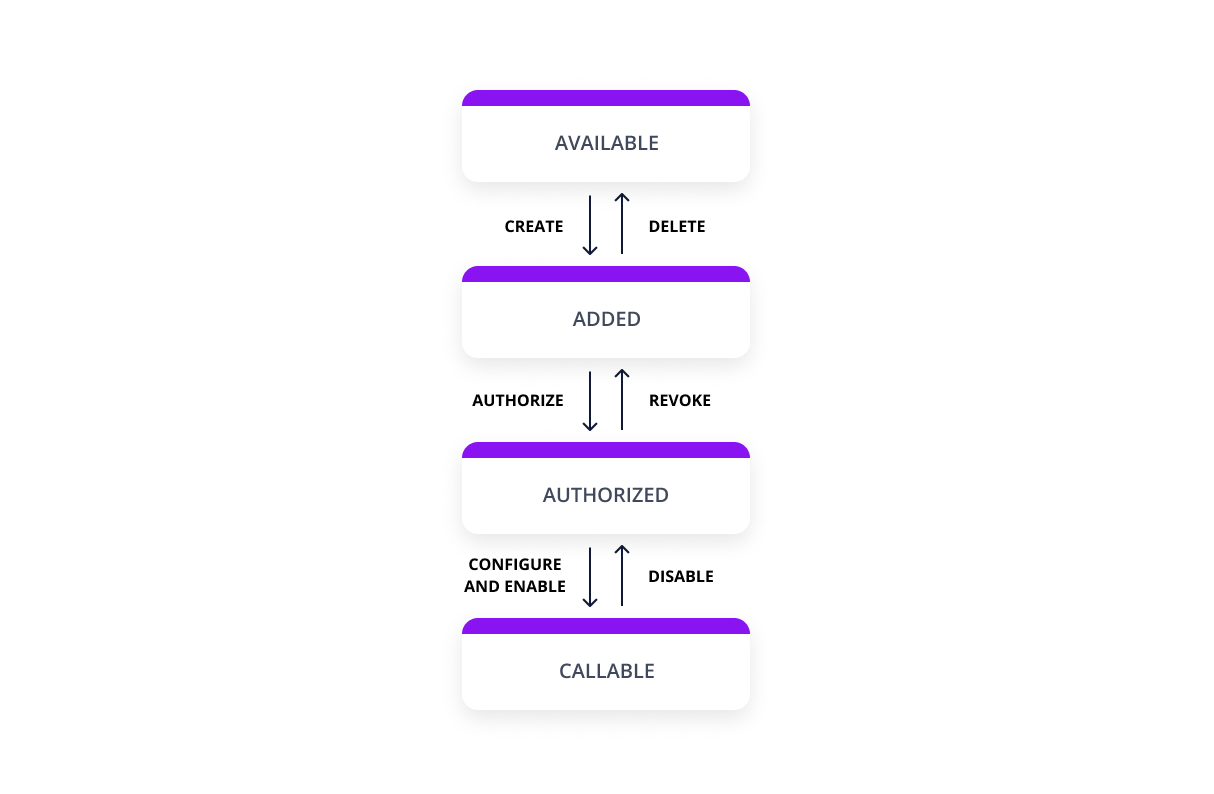 ## Unify and Proxy integration The only thing you
Visual Search Client
DevelopmentVisual Search API lets you discover insights about an image such as visually similar images, shopping sources, and related searches. The API can also perform text recognition, identify entities (people, places, things), return other topical content for the user to explore, and more. For more information, see [Visual Search Overview](https://docs.microsoft.com/azure/cognitive-services/bing-visual-search/overview). **NOTE:** To comply with the new EU Copyright Directive in France, the Bing Visual Search API must omit some content from certain EU News sources for French users. The removed content may include thumbnail images and videos, video previews, and snippets which accompany search results from these sources. As a consequence, the Bing APIs may serve fewer results with thumbnail images and videos, video previews, and snippets to French users.