 Open documentation ↗
Overview
Welcome to the Vault API 👋 When you're looking to connect to an API, the first step is authentication. Vault helps you handle OAuth flows, store API keys, and refresh access tokens from users (called consumers in Apideck). ## Base URL The base URL for all API requests is `https://unify.apideck.com` ## Get Started To use the Apideck APIs, you need to sign up for free at [https://app.apideck.com/signup](). Follow the steps below to get started. - [Create a free account.](https://app.apideck.com/signup) - Go to the [Dashboard](https://app.apideck.com/unify/unified-apis/dashboard). - Get your API key and the application ID. - Select and configure the integrations you want to make available to your users. Through the Unify dashboard, you can configure which connectors you want to support as integrations. - Retrieve the client_id and client_secret for the integration you want to activate (Only needed for OAuth integrations). - Soon, you can skip the previous step and use the Apideck sandbox credentials to get you started instead (upcoming) - Register the redirect URI for the example app (https://unify.apideck.com/vault/callback) in the list of redirect URIs under your app's settings - Use the [publishing guides](/app-listing-requirements) to get your integration listed across app marketplaces. ### Hosted Vault Hosted Vault (vault.apideck.com) is a no-code solution, so you don't need to build your own UI to handle the integration settings and authentication.  Behind the scenes, Hosted Vault implements the Vault API endpoints and handles the following features for your customers: - Add a connection - Handle the OAuth flow - Configure connection settings per integration - Manage connections - Discover and propose integration options - Search for integrations (upcoming) - Give integration suggestions based on provided metadata (email or website) when creating the session (upcoming) To use Hosted Vault, you will need to first [**create a session**](https://developers.apideck.com/apis/vault/reference#operation/sessionsCreate). This can be achieved by making a POST request to the Vault API to create a valid session for a user, hereafter referred to as the consumer ID. Example using curl: ``` curl -X POST https://unify.apideck.com/vault/sessions -H "Content-Type: application/json" -H "Authorization: Bearer <your-api-key>" -H "X-APIDECK-CONSUMER-ID: <consumer-id>" -H "X-APIDECK-APP-ID: <application-id>" -d '{"consumer_metadata": { "account_name" : "Sample", "user_name": "Sand Box", "email": "[email protected]", "image": "https://unavatar.now.sh/jake" }, "theme": { "vault_name": "Intercom", "primary_color": "#286efa", "sidepanel_background_color": "#286efa","sidepanel_text_color": "#FFFFFF", "favicon": "https://res.cloudinary.com/apideck/icons/intercom" }}' ``` ### Vault API _Beware, this is strategy takes more time to implement in comparison to Hosted Vault._ If you are building your integration settings UI manually, you can call the Vault API directly. The Vault API is for those who want to completely white label the in-app integrations overview and authentication experience. All the available endpoints are listed below. Through the API, your customers authenticate directly in your app, where Vault will still take care of redirecting to the auth provider and back to your app. If you're already storing access tokens, we will help you migrate through our Vault Migration API (upcoming). ## Domain model At its core, a domain model creates a web of interconnected entities. Our domain model contains five main entity types: Consumer (user, account, team, machine), Application, Connector, Integration, and Connection. ## Connection state The connection state is computed based on the connection flow below. 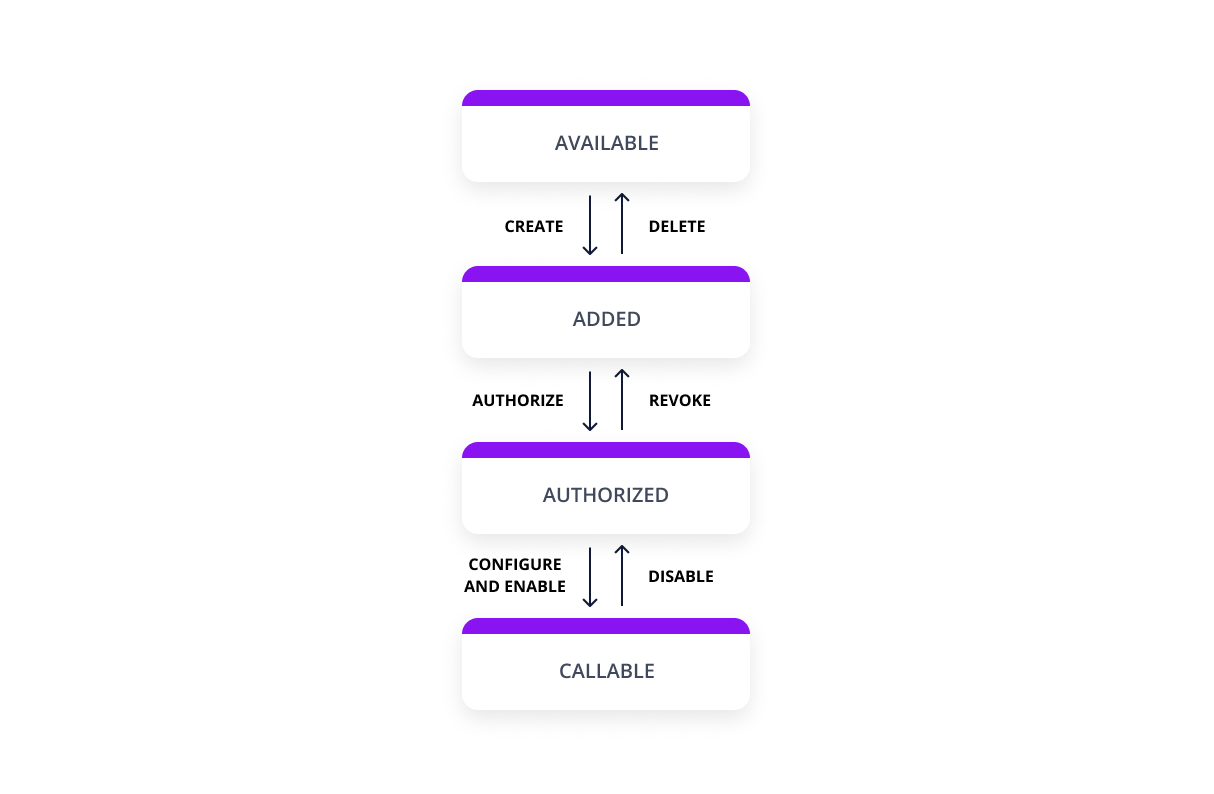 ## Unify and Proxy integration The only thing you
Vault API is a development API from apideck.com. Requests are authenticated with an API key. It is served over HTTPS. Its OpenAPI description documents 20 endpoints.
At a glance
- Authentication
- API key
- HTTPS
- Yes
- CORS
- Unknown
- Category
- Development
- Base URL
https://unify.apideck.com- Version
- 9.3.0
- Endpoints
- 20
- OpenAPI
- Specification ↗
- Spec updated
- 2023-04-19
Make a first request
Replace the placeholders; the documentation says exactly where credentials go.
curl -X GET "https://unify.apideck.com/vault/callback" \
  -H "Accept: application/json" \
-H "X-API-Key: YOUR_API_KEY"const response = await fetch("https://unify.apideck.com/vault/callback", {
method: "GET",
headers: {
"Accept": "application/json",
"X-API-Key": "YOUR_API_KEY",
},
});
const data = await response.json();
console.log(data);import requests
response = requests.request(
"GET",
"https://unify.apideck.com/vault/callback",
headers={
"Accept": "application/json",
"X-API-Key": "YOUR_API_KEY",
},
timeout=30,
)
print(response.json())Endpoints
| Method | Path | What it does |
|---|---|---|
| GET | /vault/authorize/{service_id}/{application_id} | Authorize |
| GET | /vault/callback | Callback |
| GET | /vault/connections | Get all connections |
| GET | /vault/connections/{unified_api}/{service_id} | Get connection |
| POST | /vault/connections/{unified_api}/{service_id} | Create connection |
| PATCH | /vault/connections/{unified_api}/{service_id} | Update connection |
| DELETE | /vault/connections/{unified_api}/{service_id} | Deletes a connection |
| POST | /vault/connections/{unified_api}/{service_id}/import | Import connection |
| POST | /vault/connections/{unified_api}/{service_id}/token | Get Access Token |
| GET | /vault/connections/{unified_api}/{service_id}/{resource}/config | Get resource settings |
| PATCH | /vault/connections/{unified_api}/{service_id}/{resource}/config | Update settings |
| GET | /vault/consumers | Get all consumers |
| POST | /vault/consumers | Create consumer |
| GET | /vault/consumers/{consumer_id} | Get consumer |
| PATCH | /vault/consumers/{consumer_id} | Update consumer |
| DELETE | /vault/consumers/{consumer_id} | Delete consumer |
| GET | /vault/consumers/{consumer_id}/stats | Consumer request counts |
| GET | /vault/logs | Get all consumer request logs |
| GET | /vault/revoke/{service_id}/{application_id} | Revoke connection |
| POST | /vault/sessions | Create Session |
Questions
Does the Vault API API need an API key?
Yes. The Vault API API uses API key authentication; the documentation explains how to get credentials.
Does the Vault API API support HTTPS?
Yes, the Vault API API is served over HTTPS.
How many endpoints does the Vault API API have?
Its OpenAPI description lists 20 endpoints in version 9.3.0. All of them are shown on this page.
What are alternatives to the Vault API API?
Other Development APIs include Cloudflare, Azure DevOps, IPify, App Store Connect API, StackExchange.
Similar development APIs
Compare alternatives →Cloudflare
DevelopmentManage DNS, CDN, Workers and other services; documented with an official OpenAPI 3.0 spec
Azure DevOps
DevelopmentThe Azure DevOps basic components of a REST API request/response pair
IPify
DevelopmentA simple IP Address API

App Store Connect API
DevelopmentThe data structure that represents an app store connect api resource.

StackExchange
DevelopmentQ&A forum for developers
IPinfo
DevelopmentAnother simple IP Address API
Listed from APIs.guru (CC0).