Editorial / Poster
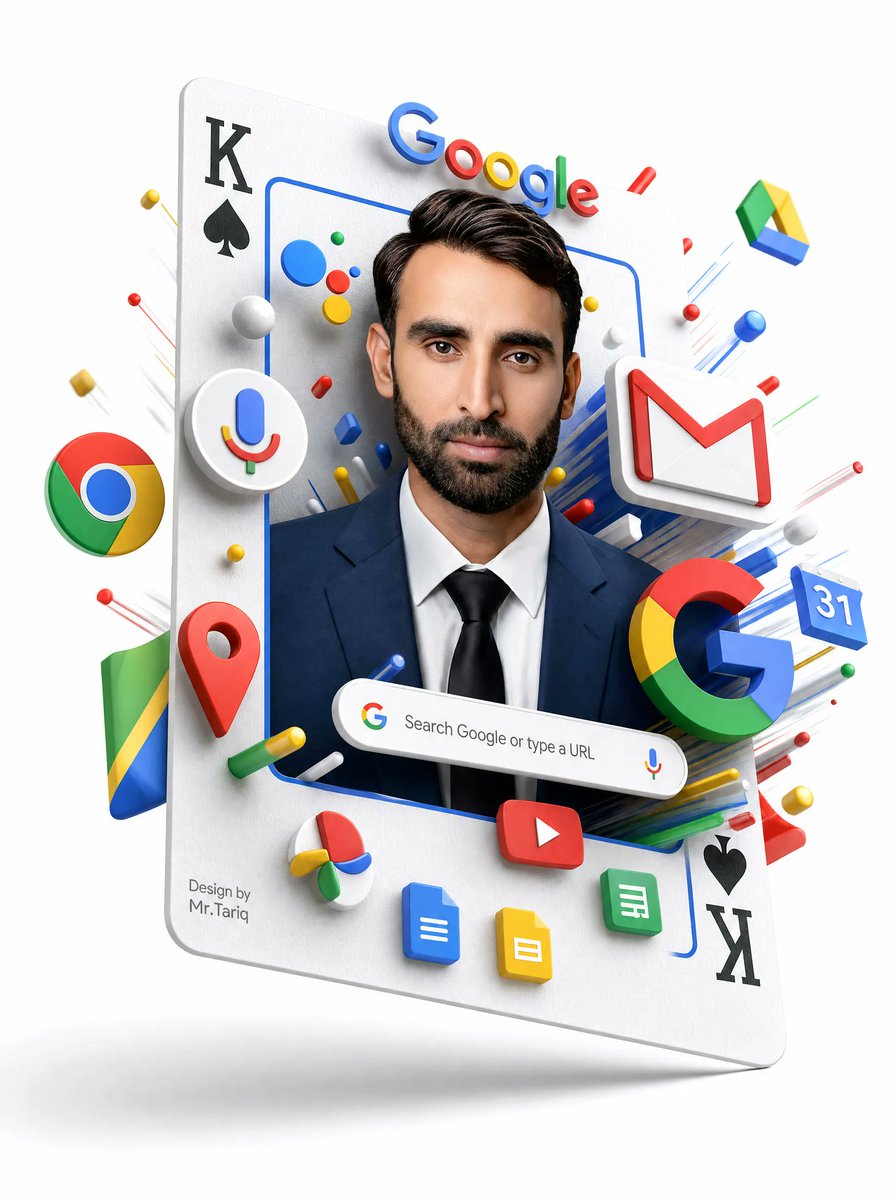
Floating Google Services Portrait Poster
a floating oversized playing card tilted slightly backward, used as a vertical portrait frame. black K with black spade symbol. black spade symbol with black K, rotated upside down. matte white paper texture with rounded corners and subtle thickness.
Fields you can change: headline brand text, search bar text, signature text, suit color, face mask color.
Full prompt
{"type":"3D surreal Google services portrait poster","style":"clean white-background commercial 3D render, glossy plastic icons, realistic studio lighting, soft shadows, floating depth, high-detail advertising composition","main_subject":{"description":"a floating oversized playing card tilted slightly backward, used as a vertical portrait frame","card_details":{"top_left":"black K with black spade symbol","bottom_right":"black spade symbol with black K, rotated upside down","surface":"matte white paper texture with rounded corners and subtle thickness"},"portrait":{"person":"front-facing professional man from chest up wearing a navy business suit, white shirt, and black tie","face":"covered by a centered opaque rectangular blur/mask in medium warm brown, hiding all facial features","hair":"dark neatly styled hair visible above the mask","frame":"thin rounded blue rectangular outline around the portrait"}},"visible_text":{"google_wordmark":"Google","search_bar":"Search Google or type a URL","signature":"Design by\nMr.Tariq"},"custom_parameters":{"headline brand text":"{argument name=\"headline brand text\" default=\"Google\"}","search bar text":"{argument name=\"search bar text\" default=\"Search Google or type a URL\"}","signature text":"{argument name=\"signature text\" default=\"Design by Mr.Tariq\"}","suit color":"{argument name=\"suit color\" default=\"navy blue\"}","face mask color":"{argument name=\"face mask color\" default=\"medium warm brown\"}"},"layout":{"centerpiece":"portrait framed inside the playing card, occupying the central vertical area","top":"large colorful Google wordmark floating above the person's head, casting small shadows","middle":"Google ecosystem icons burst outward around the portrait in layered 3D perspective","bottom":"rounded Google search bar floating across the chest area, with small Google G icon on the left and microphone icon on the right","background":"pure white empty studio background with faint floor shadow below the floating card"},"discrete_elements_count":{"major_google_service_icons":11,"major_google_service_icons_list":["Chrome logo sphere on the left", "Google Assistant microphone icon inside a white circular badge on the left", "Gmail white envelope with red M on the upper right", "Google Drive triangular icon floating upper right", "Google Maps red location pin lower left", "large multicolor Google G lower right", "Google Calendar blue tile showing 31 on the right", "YouTube red rounded rectangle play button near bottom center", "Google Docs blue document icon at bottom", "Google Slides yellow document icon at bottom", "Google Sheets green document icon at bottom right"],"playing_card_corner_markings":4,"playing_card_corner_markings_list":["top-left K", "top-left spade", "bottom-right spade", "bottom-right K"],"search_bar_components":3,"search_bar_components_list":["Google G icon", "search text", "microphone icon"],"small_decorative_objects":"many small red, blue, yellow, green and white spheres, capsules, rods, and streak lines radiating outward; do not make them readable labels"},"composition_instructions":"Create a polished, high-resolution vertical poster. Make the card appear to hover with a soft gray shadow beneath it. Use strong depth layering so icons protrude from the card and surround the portrait. Keep all logos crisp, colorful, and toy-like with beveled edges. Preserve the central face-obscuring rectangle exactly, while keeping hair, ears, suit, and tie visible. Avoid cluttering the background; all action should be concentrated around the floating card."}