Editorial / Poster
Ancient Chinese Literature PPT Poster
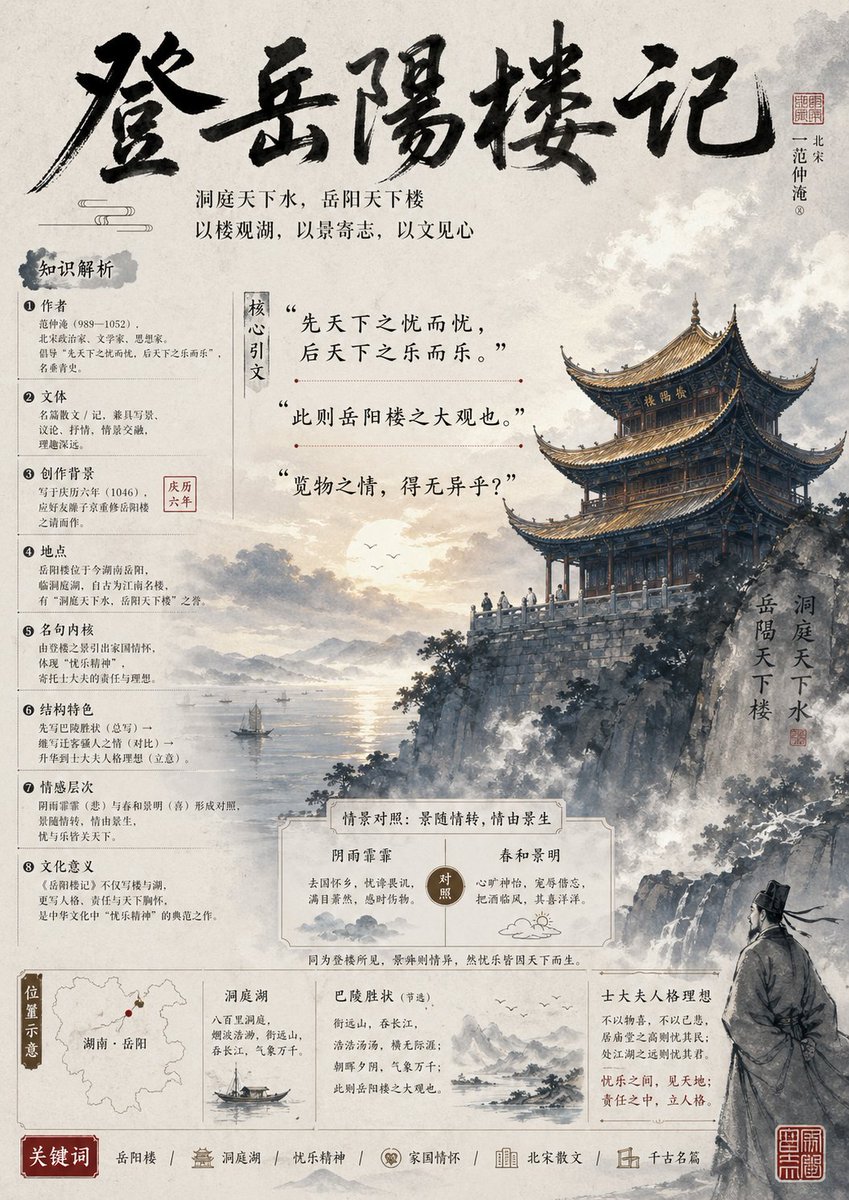
Goal: Create a vertical ancient-Chinese style literature teaching PPT poster analyzing 登岳阳楼记, with an ink-wash historical illustration, dense text-and-image layout, and Song/Yuan classroom handout aesthetics.
Fields you can change: work title.
Full prompt
Goal: Create a vertical ancient-Chinese style literature teaching PPT poster analyzing {argument name="work title" default="登岳阳楼记"}, with an ink-wash historical illustration, dense text-and-image layout, and Song/Yuan classroom handout aesthetics.
Canvas: Portrait 3:4 poster, warm off-white rice paper background with subtle fibers, gray ink stains, light cloud textures, aged edges, and muted black, sepia, red seal, and pale blue-gray tones. High information density but elegant and readable.
Layout: Top third contains a huge expressive black brush-calligraphy title across the page, with a small red seal and a vertical author label at the upper right. Under the title, place two centered subtitle lines in small serif Chinese type: “洞庭天下水,岳阳天下楼” and “以楼观湖,以景寄志,以文见心”. The left column is a structured knowledge-analysis panel; the center contains three large quoted key sentences; the right half is dominated by a dramatic Yueyang Tower illustration above cliffs and Dongting Lake. Bottom third contains comparison cards, a location map, two small literary reference cards, an author-ideal card, and a keyword strip.
Main illustration: Paint Yueyang Tower as a multi-eaved traditional wooden pavilion on a high rocky cliff, facing a vast misty lake at sunset. Include layered mountains, drifting clouds, birds, tiny boats on the lake, water reflections, rugged rocks, pine-like vegetation, and mist rising from the cliff. At lower right, show one robed ancient Chinese scholar seen from behind in gray ink, standing on rocks and looking toward the tower. Add a vertical inscription beside the tower reading “洞庭天下水 / 岳阳天下楼” with a small red seal.
Left knowledge panel: Use a vertical heading in a gray ink blot reading “知识解析”. Include exactly 8 numbered analysis items, each with a circled number and short Chinese body text: 1 Author, 2 Text genre, 3 Creative background, 4 Place, 5 Famous sentence, 6 Structural features, 7 Emotional layers, 8 Cultural meaning. Add one small red boxed date label near item 3 reading “庆历六年”. Keep all text compact, like a teaching slide.
Center quote section: Add a narrow vertical label reading “核心引文”. Include exactly 3 large quoted excerpts, separated by thin decorative horizontal rules with small red dots: “先天下之忧而忧,后天下之乐而乐。”; “此则岳阳楼之大观也。”; “览物之情,得无异乎?”.
Bottom middle comparison card: Draw a bordered cream card titled “情景对照:景随情转,借由景生”. Inside it, create exactly 2 contrasting columns: left column “阴雨霏霏” describing gloomy rain, waves, and melancholy; right column “春和景明” describing bright spring, calm waves, and joy. Put a round center badge reading “对照”, with small ink cloud and sun doodles.
Bottom information row: Create exactly 4 boxed sections from left to right. Section 1 is a “位置示意” location card with a simplified map of Hunan and a red dot labeled “湖南·岳阳”. Section 2 is a Dongting Lake card titled “洞庭湖” with a small sailboat illustration and brief notes about vast lake water and mist. Section 3 is a reference card titled “巴陵胜状(节选)” with a small mountain-water sketch and brief excerpt text. Section 4 is a card titled “士大夫人格理想” explaining concern for the world, responsibility, and moral character.
Bottom keyword strip: Add a red label “关键词”, followed by exactly 6 keyword groups separated by slashes and small icons: “岳阳楼”, “洞庭湖”, “忧乐精神”, “家国情怀”, “北宋散文”, “千古名篇”. Add two small red square seal stamps at the bottom right.
Typography and style: Combine bold wild brush calligraphy for the title, neat traditional Chinese serif type for educational notes, and thin line dividers. Use ink-wash realism mixed with PPT infographic layout. Keep all visible text in Chinese, crisp and legible. Avoid modern sans-serif UI styling, neon colors, cartoon effects, watermarks, or English text.