Editorial / Poster
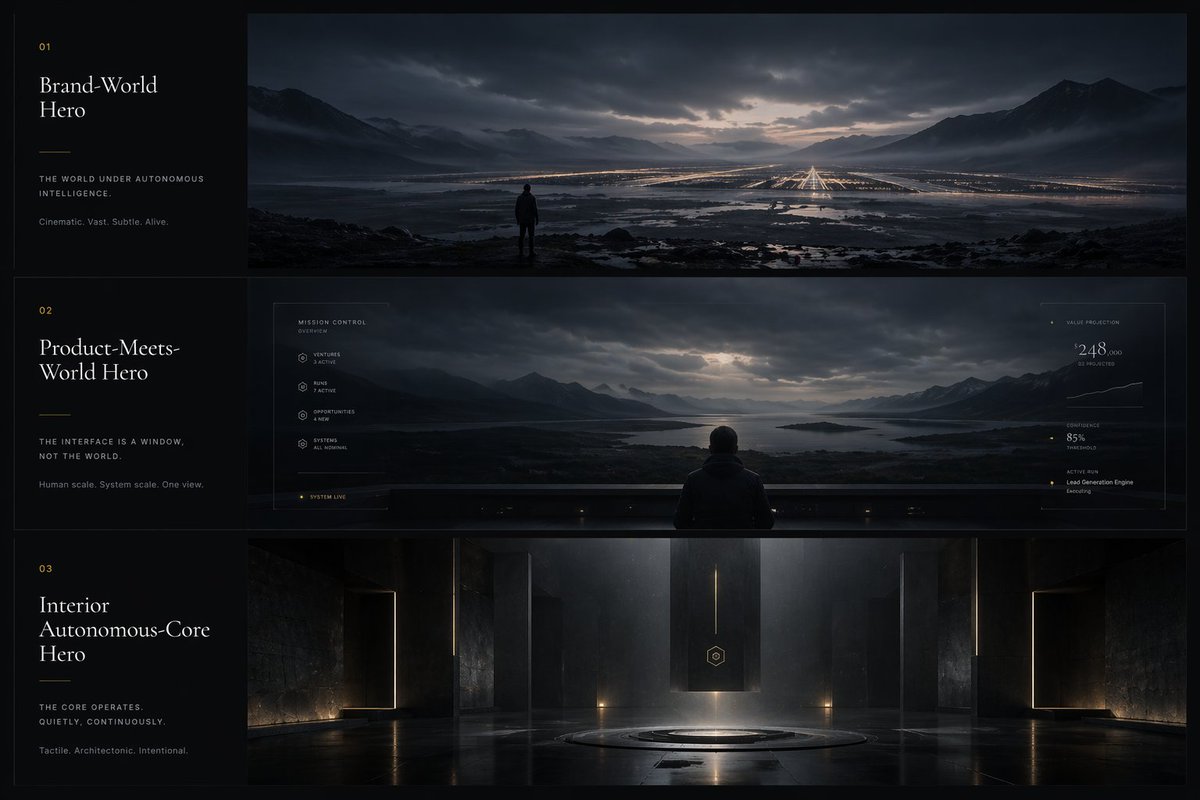
Cinematic Autonomous AI Mood Board
a visual design system for an autonomous intelligence product shown as world-scale cinematic environments and interface philosophy. Brand-World Hero. Product-Meets-World Hero. Interior Autonomous-Core Hero.
Full prompt
{"type":"cinematic app design language mood board","style":"ultra-wide premium presentation board with three horizontal cinematic panels and a narrow editorial text column on the left, dark luxury sci-fi minimalism, moody atmospheric lighting, restrained typography, near-monochrome blue-black palette with subtle warm gold accents, highly polished concept-art realism","subject":"a visual design system for an autonomous intelligence product shown as world-scale cinematic environments and interface philosophy","layout":{"canvas":"16:9 landscape","left_column":{"width":"about 20% of canvas","background":"matte black","count":3,"sections":[{"index":"01","title":"Brand-World Hero","tagline":"THE WORLD UNDER AUTONOMOUS INTELLIGENCE.","subtext":"Cinematic. Vast. Subtle. Alive.","position":"top left block"},{"index":"02","title":"Product-Meets-World Hero","tagline":"THE INTERFACE IS A WINDOW, NOT THE WORLD.","subtext":"Human scale. System scale. One view.","position":"middle left block"},{"index":"03","title":"Interior Autonomous-Core Hero","tagline":"THE CORE OPERATES. QUIETLY. CONTINUOUSLY.","subtext":"Tactile. Architectonic. Intentional.","position":"bottom left block"}],"typography":"elegant high-contrast serif for titles, tiny uppercase sans-serif for labels and body copy, generous spacing, faint gold section numbers and divider lines"},"right_panels":{"count":3,"panels":[{"position":"top","scene":"a solitary human figure standing on dark rocky ground overlooking a vast flooded valley at dusk, mountain ranges on both sides, dramatic cloud cover with a pale opening at the horizon, an enormous grid of distant warm lights and runway-like linear illumination stretching into the landscape, reflective water channels and wetlands in the foreground, sense of immense scale and silence"},{"position":"middle","scene":"the same mountainous lake landscape viewed through a giant transparent futuristic interface wall from behind a seated or standing person centered at the bottom edge, subtle HUD overlay graphics framing the panorama, thin white interface lines and tiny data labels, left-side system menu and right-side metrics panel integrated into the glass, the world outside remains dominant while the UI feels delicate and secondary","ui_components":{"count":6,"labels":["MISSION CONTROL","VENTURES","RUNS","OPPORTUNITIES","SYSTEMS","SYSTEM LIVE"]},"right_metrics":{"count":4,"labels":["VALUE PROJECTION","CONFIDENCE","ACTIVE RUN","Lead Generation Engine Executing"]}},{"position":"bottom","scene":"a monumental interior autonomous core chamber, dark stone or concrete architecture, symmetrical composition, tall monolithic walls, thin vertical light slits, a hovering or suspended rectangular black monolith in the center with a small hexagonal emblem, circular platform recessed into the floor beneath it, glossy reflective floor, shafts of cool light descending from above, sparse warm floor lights, sacred technological atmosphere"}]},"color_palette":{"count":5,"colors":["deep black","midnight blue","steel gray","misty silver","muted warm gold"]},"mood_keywords":{"count":8,"words":["cinematic","vast","subtle","alive","architectonic","intentional","quiet","futuristic"]},"rendering":"high-end concept art mixed with premium brand presentation board, photoreal environment detail, soft volumetric fog, reflective surfaces, low-key contrast, meticulous composition, luxury tech aesthetic, no bright saturated colors, no playful elements"}