Editorial / Poster
Elegant Japanese Divorce Law LP Hero
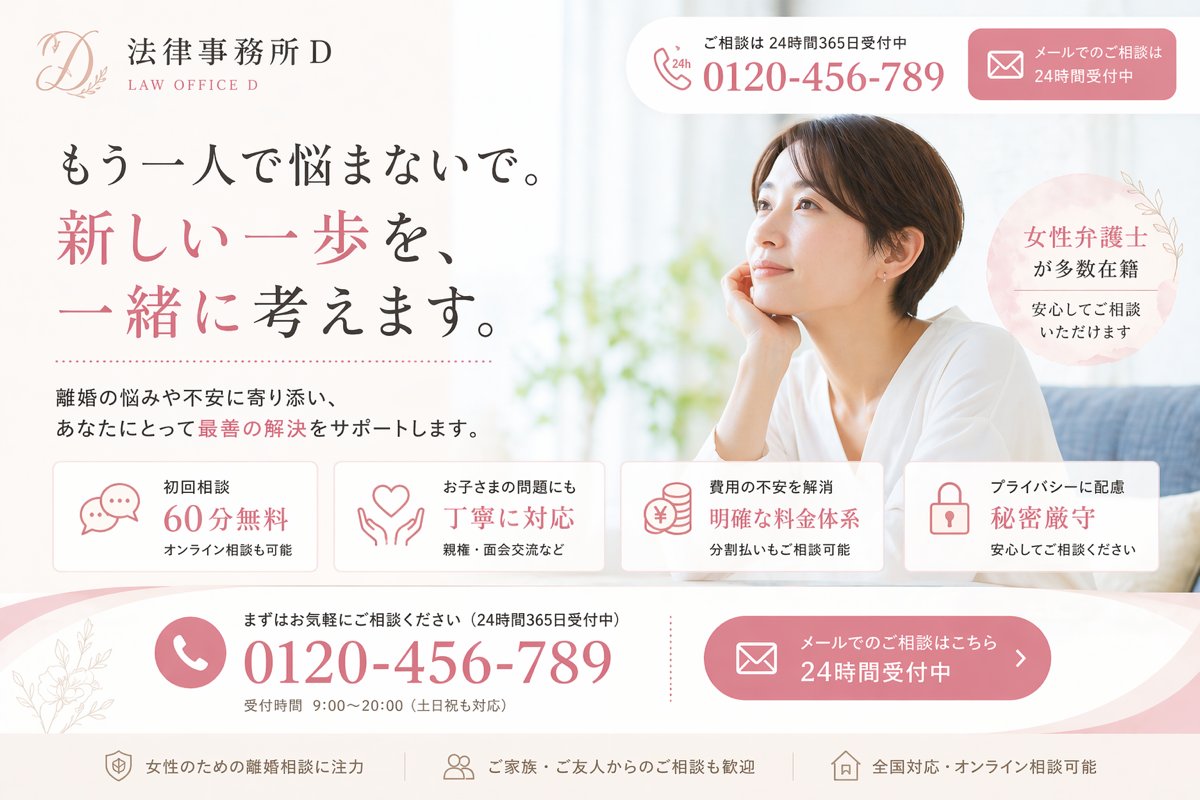
Create a polished Japanese landing page hero image for a fictional divorce-law firm, designed like a high-conversion listing ad LP. Use a soft, elegant, feminine legal-brand aesthetic with a white background, blush pink accents, light gray dividers, and subtle botanical line art.
Fields you can change: firm name, phone number.
Full prompt
Create a polished Japanese landing page hero image for a fictional divorce-law firm, designed like a high-conversion listing ad LP. Use a soft, elegant, feminine legal-brand aesthetic with a white background, blush pink accents, light gray dividers, and subtle botanical line art. The layout is a single wide desktop web hero split into two main columns: text-heavy content on the left and a lifestyle photo on the right. In the upper left, place the law firm logo and name: a delicate scripted monogram “D” with leaf ornament, followed by the Japanese office name and small English subtitle, shown as {argument name="firm name" default="法律事務所D"} and “LAW OFFICE D”. At the top right, include 2 rounded contact boxes: the first is a white phone box with a small phone icon and “24h”, short Japanese support text above, and the large phone number {argument name="phone number" default="0120-456-789"}; the second is a pink email consultation button with an envelope icon and Japanese text indicating 24-hour reception. The main headline on the left is a large Japanese serif/mincho-style statement in 3 lines: “もう一人で悩まないで。” then “新しい一歩を、” in pink, then “一緒に考えます。” mixing black and pink emphasis. Below it, add a short supporting paragraph in Japanese about supporting clients with divorce-related worries and helping find the best solution, with one phrase highlighted in pink. On the right side, show a bright, airy photo of a Japanese woman in her 30s with short dark brown hair, wearing a loose white top, seated indoors on a sofa by a window, resting her face lightly on one hand and looking thoughtful; her face is obscured by a large rectangular blur block for privacy. Near her shoulder, place a pale pink circular badge with Japanese text saying that many female lawyers are on staff and consultations can be made with peace of mind. Across the lower middle, place 4 evenly spaced rounded white feature cards with thin borders and pink line icons. Card 1 shows a speech-bubble icon and text for “初回相談 60分無料” with a smaller line saying online consultation is also available. Card 2 shows a heart-in-hands icon and text about handling children’s issues carefully, with a smaller line mentioning custody and visitation. Card 3 shows stacked coins with a yen symbol and text about relieving anxiety over fees with a clear pricing structure, plus a smaller line about installment consultation. Card 4 shows a padlock icon and text about privacy protection and strict confidentiality, with a smaller line encouraging safe consultation. At the bottom, add a large curved pink-and-white call-to-action band spanning the width. On the left side of this band, include a circular phone icon, small Japanese text encouraging casual consultation and 24/365 reception, then the large repeated phone number {argument name="phone number" default="0120-456-789"}, and beneath it smaller reception hours text. On the right side of the band, place a large pink rounded email button with envelope icon and Japanese text saying email consultation is available 24 hours. Along the very bottom, place 3 slim footer-style trust points separated horizontally: one about focusing on divorce consultation for women, one about consultations from family and friends also welcome, and one about nationwide and online consultations. Use refined Japanese typography, spacious layout, soft shadows, premium legal-advertising design, and realistic web-LP composition. Keep all visible text in Japanese except the small English subtitle “LAW OFFICE D”.