Editorial / Poster
Retro Editorial Illustration Split Poster
Full prompt
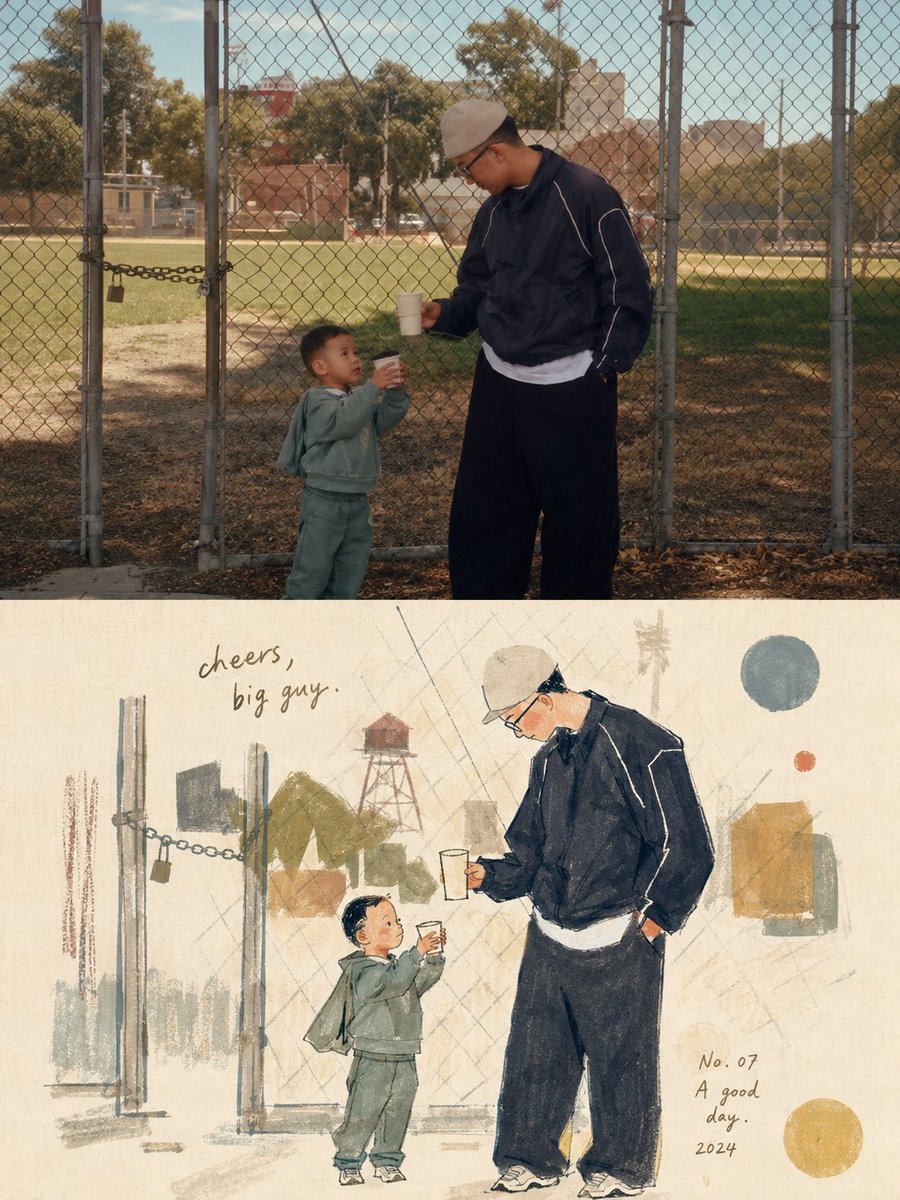
Please turn each photo I upload into a separate, high-end design poster. Do not combine multiple photos into a collage; output one poster per photo. Use an overall {argument name="composition ratio" default="3:4 vertical composition"}, strictly divided into two equal sections, with the top and bottom each occupying exactly 50% of the canvas height.
For the top half, preserve the original photograph, maintaining the subject’s structure, realistic texture, natural lighting, and original color atmosphere. Apply only subtle, refined photographic color grading to give it the quality of editorial magazine photography and fine-art exhibition imagery.
For the bottom half, extract the most recognizable subject, silhouette, pose, and narrative relationships from the photograph, then reinterpret them as a light, naïve, retro hand-drawn editorial illustration. Do not mechanically trace or reproduce every detail. Instead, reinterpret the subject through simplified forms, slightly exaggerated proportions, symbolic features, and humorous visual metaphors. Blend the aesthetics of modernist editorial illustration, Bauhaus composition, children’s picture books, and fashion sketching. Keep the forms concise and the lines thin, delicate, and slightly imperfect by hand.
Derive the color palette from the photograph above, using a limited palette with high lightness and low-to-medium saturation. Leave generous areas of off-white or pale negative space. Use a mixed-media texture inspired by watercolor, gouache, colored pencil, oil pastel, and dry-brush techniques. Preserve visible paper grain, rough edges, and slight misregistration. Keep the overall composition balanced, airy, and spacious.
View original prompt
请将我上传的每一张照片分别制作成一张独立的高级设计海报,不多图拼接,每张照片单独输出。整体采用{argument name="构图比例" default="3:4竖版构图"},上下两个区域高度严格1:1,各占画面50%。 上半部分保留原始照片,保持主体结构、真实质感、自然光影和原有色彩氛围,仅进行轻微高级摄影调色,使其具有杂志摄影和艺术展览质感。为适配画幅,可自然扩展天空、地面或环境背景,但不得拉伸、扭曲或改变主体。 下半部分提取照片中最具识别性的主体、轮廓、姿态与叙事关系,重构为轻盈、稚拙、复古的手绘编辑插画。不要机械描摹细节,以概括造型、略微夸张比例、符号化特征和幽默视觉隐喻重新表达,并保持一眼可以识别原物。风格融合现代主义编辑插画、包豪斯构成、儿童绘本与时尚速写气质,形体简练,线条纤细而略带手工误差,轻松、聪明、俏皮而克制。 配色从上方照片提取,采用高明度、低至中等饱和度的有限色盘,大面积米白或浅色留白,以少量互补色作视觉跳点。使用水彩、水粉、彩铅、粉蜡笔与干刷混合质感,保留纸张颗粒、边缘毛糙、透白、套印错位和不完美笔触,避免光滑矢量、写实光影、3D渲染和塑料质感。 整体构图平衡、轻盈、有呼吸感,可加入少量手绘线条、几何符号或抽象元素。文字可少量使用复古手写标题、编号或年份,使其自然融入插画。整体参考旧时尚绘本、旅行插画、艺术出版物和高级编辑设计,呈现温柔、复古、松弛、时髦、幽默、略带笨拙与古怪自信的气质,避免卡通感、廉价感、电商感和模板