Editorial / Poster
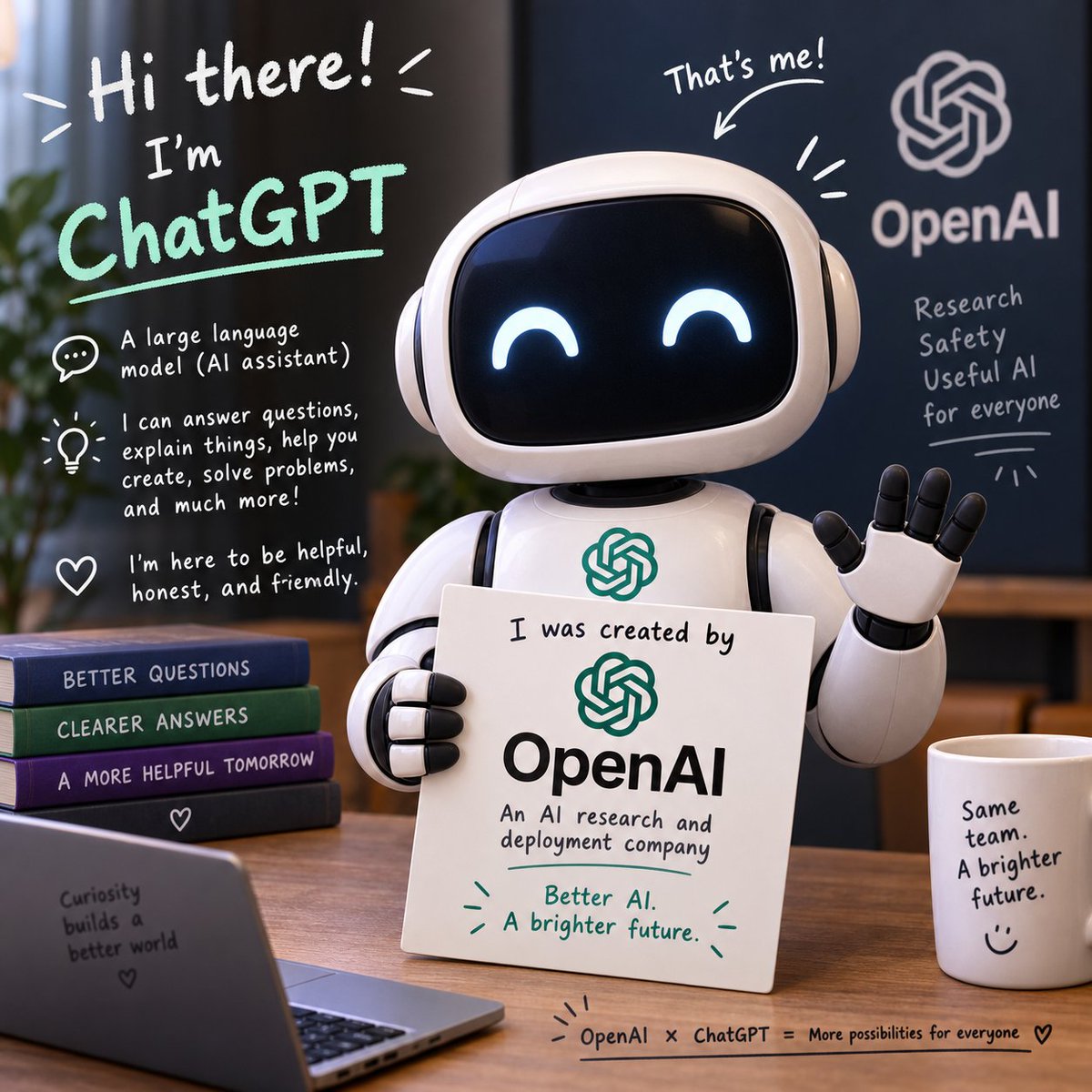
Friendly ChatGPT Robot Office Scene
Goal: Create a square, polished 3D promotional illustration introducing ChatGPT as a friendly AI assistant made by OpenAI.
Fields you can change: character name, company name, headline text.
Full prompt
Goal: Create a square, polished 3D promotional illustration introducing {argument name="character name" default="ChatGPT"} as a friendly AI assistant made by {argument name="company name" default="OpenAI"}.
Canvas: 1:1 square image, warm indoor office setting, shallow depth of field, soft cinematic lighting, realistic 3D toy-like render with handwritten whiteboard-style annotations overlaid on the scene.
Main subject: Center-right is a cute glossy white robot assistant with a rounded rectangular black screen face, glowing happy crescent eyes, rounded ear-like side pods, segmented arms, and a small OpenAI knot logo on its chest. The robot is waving with its right hand and holding a white placard with its left hand. The placard reads: “I was created by” above a green OpenAI logo, then “OpenAI” in large black type, then “An AI research and deployment company,” and at the bottom in green: “Better AI. A brighter future.” with small decorative emphasis marks.
Layout and objects: Place the robot behind a wooden desk. Include exactly 4 stacked books on the left side of the desk, labeled from top to bottom: “BETTER QUESTIONS,” “CLEARER ANSWERS,” “A MORE HELPFUL TOMORROW,” and a bottom dark book with a small heart icon. In the lower-left foreground, include an open laptop angled toward the viewer with text on its back: “Curiosity builds a better world” plus a small heart. On the right side of the desk, include 1 white coffee mug labeled: “Same team. A brighter future.” with a simple smiley face. Along the bottom edge of the desk, add a small handwritten caption: “OpenAI × ChatGPT = More possibilities for everyone” followed by a heart.
Background: Use a dark navy wall or board on the right with a large white OpenAI knot logo and the word “OpenAI.” Under it, handwritten text reads exactly 4 lines: “Research,” “Safety,” “Useful AI,” “for everyone,” with a small underline and decorative rays. Add a blurred plant on the far left and warm office furniture in the background.
Handwritten annotation overlays: Include a large top-left greeting in white: “Hi there!” with energetic lines. Below it, write “I’m” and then {argument name="headline text" default="ChatGPT"} in large mint-green handwritten letters with an underline. Add exactly 3 explanatory icon callouts down the left side: 1 speech bubble icon with “A large language model (AI assistant)”; 1 lightbulb icon with “I can answer questions, explain things, help you create, solve problems, and much more!”; 1 heart icon with “I’m here to be helpful, honest, and friendly.” Above the robot’s head, add “That’s me!” with an arrow pointing to the robot and a few emphasis strokes.
Visual style: friendly, optimistic, clean tech branding, rounded forms, glossy materials, white and mint-green marker typography, warm wood tones, deep blue background, professional but playful. Keep the OpenAI branding readable, preserve the exact text above, avoid extra logos, avoid misspelled words, and keep all typography legible.