Editorial / Interface
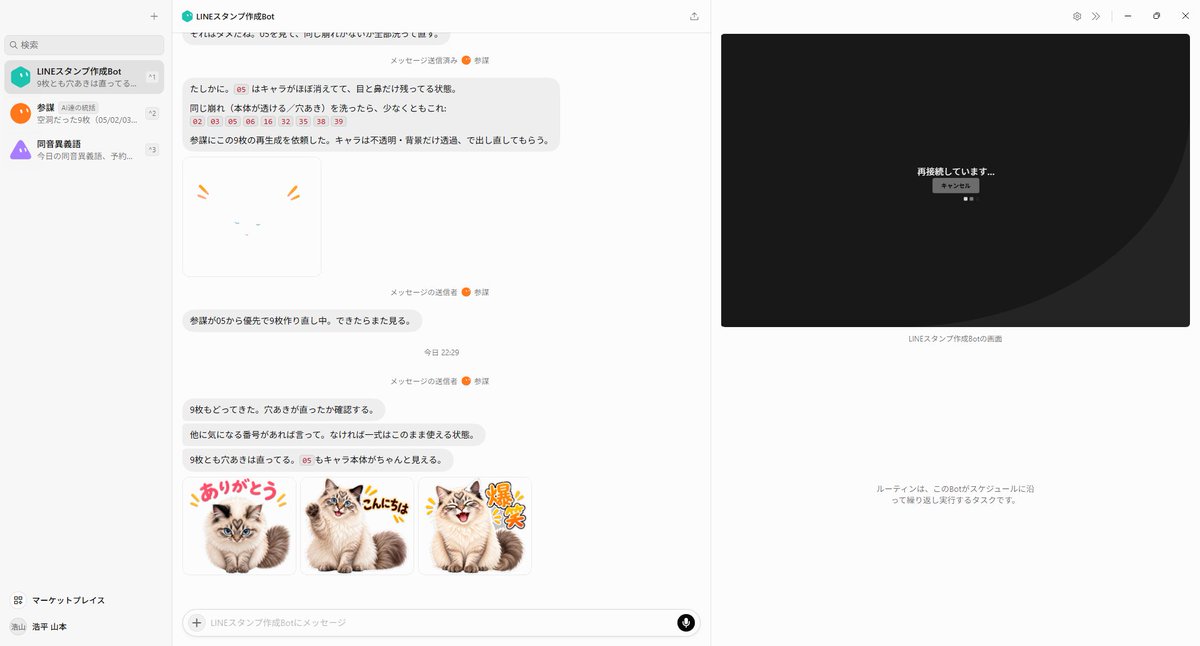
AI Agent LINE Sticker Progress Screenshot
Full prompt
Using the provided reference image as the base screenshot, update the chat UI to show a later point in the same LINE sticker creation workflow rather than the initial setup. Keep the overall desktop layout, left sidebar, chat app framing, and right-side remote-screen panel consistent, but replace the chat contents with progress/status messages about regenerating stickers and checking transparency. Add exactly 1 failed/unfinished sticker preview near the upper-middle of the chat: a mostly blank white square with only tiny cat facial marks and two orange emphasis strokes, implying the character disappeared. Add exactly 3 completed sticker thumbnails in a row near the bottom of the chat, all based on the same fluffy cat from the reference materials, with transparent/white sticker-style backgrounds and colorful Japanese LINE-sticker lettering: 1) {argument name="first sticker text" default="ありがとう"} with the cat sitting cutely, 2) {argument name="second sticker text" default="こんにちは"} with the cat smiling and waving/posing, 3) {argument name="third sticker text" default="爆笑"} with the cat laughing energetically. Use a playful sticker aesthetic with thick outlined text, small comic accent marks, and clean cutout edges. On the right-side remote panel, replace the file-browser view with a dark reconnection screen showing centered Japanese text {argument name="connection status text" default="再接続しています..."} and a small cancel button beneath it. Preserve the sense that this is a live AI-agent chat screenshot documenting automatic sticker generation, not a standalone sticker sheet.