Editorial / Poster
Mechanical Keyboard Encyclopedia Poster Prompt
Full prompt
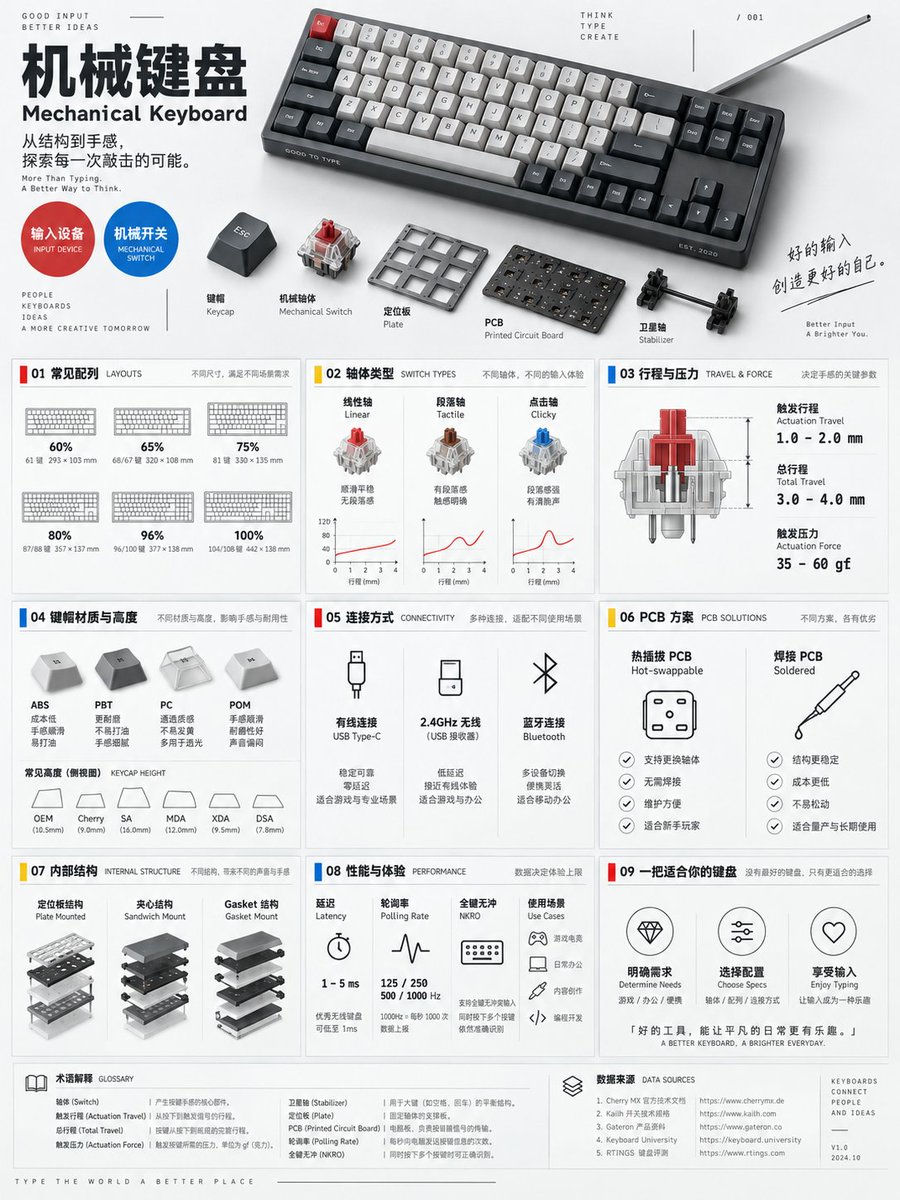
A 3:4 vertical mechanical keyboard encyclopedia information poster, blending Bauhaus functionalism, industrial design archives, and modern digital lab visuals. The top displays a compact mechanical keyboard in a diagonal composition, alongside exploded views of keycaps, switches, plate, PCB, and stabilizers, with studio hard-soft lighting creating clear micro-shadows; the title "Mechanical Keyboard" is arranged along the left grid, with the English subtitle "Mechanical Keyboard", accompanied by circular category tags "Input Device / Mechanical Switch", structural explosion diagrams, and keyboard size scales.
The middle section uses restrained accent colors of red, yellow, and blue with modular geometric cards, fully presenting nine types of information: common layouts (60%, 65%, 75%, 80%, 96%, 100%); tactile curves for linear, tactile, and clicky switches; pre-travel and total travel; actuation force; common keycap materials and profiles; connection methods (wired, 2.4GHz, Bluetooth); differences between hot-swap and soldered PCBs; internal structures like plates, sandwich, and gasket mounts; latency, polling rate, N-key rollover, and usage scenarios.
Each module retains only one main graphic to avoid visual clutter. Uses a 12-column grid, 48pt margins, 8pt baseline, and uniform 2pt linear icons. Background is near-white light gray, text is dark gray, data uses monospaced fonts. The bottom includes glossary and parameter source bars, stating "differences exist across brands and models", prohibiting fabrication of specific model performance or non-existent technical standards.
View original prompt
一张 3:4 竖版机械键盘百科信息海报,融合包豪斯功能主义、工业设计档案与现代数码实验室视觉。顶部以斜切构图展示一把紧凑型机械键盘,并在旁边拆解展示键帽、机械轴体、定位板、PCB 和卫星轴,工作室硬柔结合光形成清晰微阴影;标题“机械键盘”沿左侧网格排列,英文副标题“Mechanical Keyboard”,搭配“输入设备/机械开关”圆形分类标签、结构爆炸图与键盘尺寸比例尺。 中部采用红、黄、蓝三种克制强调色和模块化几何卡片,完整呈现九类信息:60%、65%、75%、80%、96%、100%常见配列;线性轴、段落轴、点击轴触感曲线;触发行程与总行程;触发压力;键帽常见材质与高度;有线、2.4GHz、蓝牙连接方式;热插拔与焊接 PCB 区别;定位板、夹心结构与 Gasket 等常见内部结构;延迟、轮询率、全键无冲与使用场景。 每个模块只保留一种主要图形,避免视觉堆叠。采用12列网格、48pt边距、8pt基线、统一2pt线性图标。背景为接近纯白的浅灰,文字为深灰,数据使用等宽字体。底部设置术语解释与参数来源栏,明确“不同品牌与型号存在差异”,禁止虚构具体型号性能或不存在的技术标准。