 Open documentation ↗
Overview
A friendly little API to help you interact with the ClearBlade platform.
ClearBlade API is an iot API from clearblade.com. It needs no API key. It is served over HTTPS. Its OpenAPI description documents 220 endpoints.
At a glance
- Authentication
- No auth
- HTTPS
- Yes
- CORS
- Unknown
- Category
- IoT
- Base URL
https://platform.clearblade.com/- Version
- 3.0
- Endpoints
- 220
- OpenAPI
- Specification ↗
- Spec updated
- 2023-03-06
Make a first request
Replace the placeholders; the documentation says exactly where credentials go.
curl -X GET "https://platform.clearblade.com/admin/allapps" \
-H "Accept: application/json"const response = await fetch("https://platform.clearblade.com/admin/allapps", {
method: "GET",
headers: {
"Accept": "application/json",
},
});
const data = await response.json();
console.log(data);import requests
response = requests.request(
"GET",
"https://platform.clearblade.com/admin/allapps",
headers={
"Accept": "application/json",
},
timeout=30,
)
print(response.json())Endpoints
| Method | Path | What it does |
|---|---|---|
| GET | /admin/allapps | DEVELOPER - Get platform assets |
| GET | /admin/allcollections | DEVELOPER - Get collections |
| GET | /admin/allsystems | DEVELOPER - Get systems |
| GET | /admin/audit | AUDIT - Get Audit Info |
| GET | /admin/audit/count | Audit - Get counts |
| GET | /admin/audit/{systemKey} | AUDIT - Get Audit Info |
| GET | /admin/audit/{systemKey}/count | AUDIT - Get counts |
| POST | /admin/auth | DEVELOPER - Authenticate dev |
| POST | /admin/checkauth | DEVELOPER - Verifies access to the system |
| POST | /admin/collectionmanagement | DEVELOPER - Create collection |
| PUT | /admin/collectionmanagement | DEVELOPER - Update collection |
| DELETE | /admin/collectionmanagement | DEVELOPER - Delete collection |
| GET | /admin/count/developers | ADMIN - Get number of admin developers |
| GET | /admin/count/systems | ADMIN - Get number of systems available |
| GET | /admin/database/status | DATABASES - Retrieves all internal and external database statuses |
| PUT | /admin/developers/{systemKey} | ADMIN - Add/Remove/Change owner |
| POST | /admin/devices/keys/{systemKey}/{deviceName} | DEVICE -Creates rotating keys for a device. |
| DELETE | /admin/devices/keys/{systemKey}/{deviceName} | DEVELOPER - Delete rotating keys for a device |
| GET | /admin/devices/{systemKey} | DEVELOPER - Get devices with or without a query |
| PUT | /admin/devices/{systemKey} | DEVELOPER - Update devices using a query |
| DELETE | /admin/devices/{systemKey} | DEVELOPER - Delete devices using a query |
| GET | /admin/devices/{systemKey}/{name} | DEVELOPER - Get device |
| POST | /admin/devices/{systemKey}/{name} | DEVELOPER - Create device |
| PUT | /admin/devices/{systemKey}/{name} | DEVELOPER - Update device |
| DELETE | /admin/devices/{systemKey}/{name} | DEVELOPER - Delete device |
| GET | /admin/edges/template/{systemKey} | DEVELOPER - Get edge template |
| PUT | /admin/edges/template/{systemKey}/{edgeName} | DEVELOPER - Update edge template |
| GET | /admin/edges/{systemKey} | DEVELOPER - Get edges |
| GET | /admin/edges/{systemKey}/control | DEVELOPER - Get edges for the adapter |
| GET | /admin/edges/{systemKey}/{edgeName} | DEVELOPER - Get edge |
| POST | /admin/edges/{systemKey}/{edgeName} | DEVELOPER - Create edge |
| PUT | /admin/edges/{systemKey}/{edgeName} | DEVELOPER - Update edge |
| DELETE | /admin/edges/{systemKey}/{edgeName} | DEVELOPER - Delete edge |
| POST | /admin/logout | DEVELOPER - Log out dev |
| GET | /admin/pkey | ADMIN - Get platform license key. |
| GET | /admin/platform/developer | ADMIN - Get developer |
| POST | /admin/platform/developer | DEVELOPER - Disable developer |
| GET | /admin/platform/developers | ADMIN - Get developers |
| GET | /admin/platform/systems | AUDIT - Get list of systems that have been updated |
| GET | /admin/platform/systems/{systemKey} | AUDIT - Get list of systems that have been updated |
| GET | /admin/platform/{systemKey} | ADMIN - Get system status |
| GET | /admin/portals/{systemKey} | DEVELOPER - Gets the information for a portal |
| PUT | /admin/putpass | DEVELOPER - Change dev password |
| POST | /admin/reg | DEVELOPER - Register new dev |
| PUT | /admin/regensystemsecret | DEVELOPER - Regen secret |
| POST | /admin/resetpassword | ADMIN - Change dev password (Admin) |
| GET | /admin/settings/email-service | 2FA - Get Email Settings |
| POST | /admin/settings/email-service | 2FA - Create Email Communication |
| PUT | /admin/settings/email-service | 2FA - Update Email Settings |
| DELETE | /admin/settings/email-service | 2FA - Delete email settings |
| POST | /admin/settings/email-service/test | 2FA - Test Email Service |
| GET | /admin/settings/security | 2FA - View Security Settings |
| PUT | /admin/settings/security | 2FA - Update Security Settings |
| GET | /admin/settings/sms-service | 2FA - Get SMS Settings |
| POST | /admin/settings/sms-service | 2FA - Create SMS Communication |
| PUT | /admin/settings/sms-service | 2FA - Update SMS Settings |
| DELETE | /admin/settings/sms-service | 2FA - Delete SMS settings |
| POST | /admin/settings/sms-service/test | 2FA - Test SMS Service |
| GET | /admin/systems/{devEmail} | Get Systems for a developer |
| GET | /admin/triggers/definitions | DEVELOPER - Get trigger definitions |
| GET | /admin/triggers/handlers/{systemKey} | DEVELOPER - Get trigger handlers |
| GET | /admin/triggers/handlers/{systemKey}/{name} | DEVELOPER - Get trigger handler |
| POST | /admin/triggers/handlers/{systemKey}/{name} | DEVELOPER - Create trigger handler |
| PUT | /admin/triggers/handlers/{systemKey}/{name} | DEVELOPER - Update trigger handler |
| DELETE | /admin/triggers/handlers/{systemKey}/{name} | DEVELOPER - Delete trigger handler |
| GET | /admin/triggers/timers/{systemKey} | DEVELOPER - Get timer handlers |
| GET | /admin/triggers/timers/{systemKey}/{name} | DEVELOPER - Get timer handler |
| POST | /admin/triggers/timers/{systemKey}/{name} | DEVELOPER - Create time handler |
| PUT | /admin/triggers/timers/{systemKey}/{name} | DEVELOPER - Update timer handler |
| DELETE | /admin/triggers/timers/{systemKey}/{name} | DEVELOPER - Delete trigger handler |
| GET | /admin/user/{systemKey} | DEVELOPER - Get list of users and information |
| POST | /admin/user/{systemKey} | DEVELOPER - Add user |
| PUT | /admin/user/{systemKey} | DEVELOPER - Change user information and permissions |
| DELETE | /admin/user/{systemKey} | DEVELOPER - Delete user |
| GET | /admin/user/{systemKey}/columns | DEVELOPER - Get users column info. |
| POST | /admin/user/{systemKey}/columns | DEVELOPER - Add new column |
| GET | /admin/user/{systemKey}/roles | DEVELOPER - Get list of roles |
| POST | /admin/user/{systemKey}/roles | DEVELOPER - Add new role |
| PUT | /admin/user/{systemKey}/roles | DEVELOPER - Changes roles settings |
| DELETE | /admin/user/{systemKey}/roles | DEVELOPER - Delete roles |
| GET | /admin/user/{systemKey}/roles/count | DEVELOPER - Get number of roles |
| GET | /admin/userinfo | DEVELOPER - Get dev info |
| PUT | /admin/userinfo | 2FA - Update developer 2FA information. |
| GET | /admin/v/4/service_caches/{systemKey} | SHARED CACHE - Gets shared caches for a system |
| POST | /admin/v/4/service_caches/{systemKey}/{cacheName} | SHARED CACHE - Add a shared cache |
| PUT | /admin/v/4/service_caches/{systemKey}/{cacheName} | SHARED CACHE - Update a shared cache |
| DELETE | /admin/v/4/service_caches/{systemKey}/{cacheName} | SHARED CACHE - Delete a shared cache |
| GET | /admin/v/4/session/{systemKey}/device | SESSION - Get device session info |
| DELETE | /admin/v/4/session/{systemKey}/device | SESSION - Delete device session |
| GET | /admin/v/4/session/{systemKey}/device/count | SESSION - Get device session count |
| GET | /admin/v/4/session/{systemKey}/user | SESSION - Get user session info |
| DELETE | /admin/v/4/session/{systemKey}/user | SESSION - Delete user session |
| GET | /admin/v/4/session/{systemKey}/user/count | SESSION - Get user session count |
| GET | /admin/v/4/systemmanagement | DEVELOPER - Get system info |
| POST | /admin/v/4/systemmanagement | DEVELOPER - Create system |
| PUT | /admin/v/4/systemmanagement | DEVELOPER - Update system info |
| DELETE | /admin/v/4/systemmanagement | DEVELOPER - Delete system |
| GET | /admin/v/4/webhook/{systemKey} | WEBHOOKS - Returns webhooks in the system |
| POST | /admin/v/4/webhook/{systemKey}/{name} | WEBHOOKS - Creates a webhook |
| PUT | /admin/v/4/webhook/{systemKey}/{name} | WEBHOOKS - Update a webhook |
Showing the first 100 of 220 endpoints; the full list is in the documentation.
Questions
Does the ClearBlade API API need an API key?
No. The ClearBlade API API can be called without an API key or sign-up, which makes it handy for prototypes and front-end demos.
Does the ClearBlade API API support HTTPS?
Yes, the ClearBlade API API is served over HTTPS.
How many endpoints does the ClearBlade API API have?
Its OpenAPI description lists 220 endpoints in version 3.0. The first 100 are shown on this page.
What are alternatives to the ClearBlade API API?
Other IoT APIs include Brain Web API, Adafruit IO REST API, Netatmo, Influx OSS API Service, Hardware Sentry TrueSight Presentation Server REST API.
Similar iot APIs
Compare alternatives →
Brain Web API
IoTThis document describes the [Intellifi Brain](https://intellifi.zendesk.com/hc/en-us/categories/360000685454) Web API specification using the [OpenAPI specification](https://github.com/OAI/OpenAPI-Specification). The Brain Web API is a RESTful API that allows you to interact with the [Intellifi devices](https://intellifi.zendesk.com/hc/en-us/categories/360000685434) and services in a powerful and simple way. Our end-to-end solution allows you to localize your items/assets based on technologies such as RFID and Bluetooth. # Try it out! The API can be tried out and tested using the ['api-doc/tryitout' endpoint on this site](./tryitout/). This UI allows anyone to visualize and interact with the API’s resources without having any of the implementation logic in place. It’s automatically generated from this Specification, with the visual documentation making it easy for back end implementation and client side consumption. # Authentication Applications are required to provide some form of authentication to the API for every secured endpoint. The Brain offers two forms of authentication. - API key (Via an HTTP request header or URL parameter) - Session cookie <!-- ReDoc-Inject: <security-definitions> --> # See also - About Intellifi and what we do: [intellifi.nl](https://intellifi.nl) - Technical and background information: [intellifi.zendesk.com](https://intellifi.zendesk.com)

Adafruit IO REST API
IoT### The Internet of Things for Everyone The Adafruit IO HTTP API provides access to your Adafruit IO data from any programming language or hardware environment that can speak HTTP. The easiest way to get started is with [an Adafruit IO learn guide](https://learn.adafruit.com/series/adafruit-io-basics) and [a simple Internet of Things capable device like the Feather Huzzah](https://www.adafruit.com/product/2821). This API documentation is hosted on GitHub Pages and is available at [https://github.com/adafruit/io-api](https://github.com/adafruit/io-api). For questions or comments visit the [Adafruit IO Forums](https://forums.adafruit.com/viewforum.php?f=56) or the [adafruit-io channel on the Adafruit Discord server](https://discord.gg/adafruit). #### Authentication Authentication for every API request happens through the `X-AIO-Key` header or query parameter and your IO API key. A simple cURL request to get all available feeds for a user with the username "io_username" and the key "io_key_12345" could look like this: $ curl -H "X-AIO-Key: io_key_12345" https://io.adafruit.com/api/v2/io_username/feeds Or like this: $ curl "https://io.adafruit.com/api/v2/io_username/feeds?X-AIO-Key=io_key_12345 Using the node.js [request](https://github.com/request/request) library, IO HTTP requests are as easy as: ```js var request = require('request'); var options = { url: 'https://io.adafruit.com/api/v2/io_username/feeds', headers: { 'X-AIO-Key': 'io_key_12345', 'Content-Type': 'application/json' } }; function callback(error, response, body) { if (!error && response.statusCode == 200) { var feeds = JSON.parse(body); console.log(feeds.length + " FEEDS AVAILABLE"); feeds.forEach(function (feed) { console.log(feed.name, feed.key); }) } } request(options, callback); ``` Using the ESP8266 Arduino HTTPClient library, an HTTPS GET request would look like this (replacing `---` with your own values in the appropriate locations): ```arduino /// based on /// https://github.com/esp8266/Arduino/blob/master/libraries/ESP8266HTTPClient/examples/Authorization/Authorization.ino #include <Arduino.h> #include <ESP8266WiFi.h> #include <ESP8266WiFiMulti.h> #include <ESP8266HTTPClient.h> ESP8266WiFiMulti WiFiMulti; const char* ssid = "---"; const char* password = "---"; const char* host = "io.adafruit.com"; const char* io_key = "---"; const char* path_with_username = "/api/v2/---/dashboards"; // Use web browser to view and copy // SHA1 fingerprint of the certificate const char* fingerprint = "77 00 54 2D DA E7 D8 03 27 31 23 99 EB 27 DB CB A5 4C 57 18"; void setup() { Serial.begin(115200); for(uint8_t t = 4; t > 0; t--) { Serial.printf("[SETUP] WAIT %d...\n", t); Serial.flush(); delay(1000); } WiFi.mode(WIFI_STA); WiFiMulti.addAP(ssid, password); // wait for WiFi connection while(WiFiMulti.run() != WL_CONNECTED) { Serial.print('.'); delay(1000); } Serial.println("[WIFI] connected!"); HTTPClient http; // start request with URL and TLS cert fingerprint for verification http.begin("https://" + String(host) + String(path_with_username), fingerprint); // IO API authentication http.addHeader("X-AIO-Key", io_key); // start connection and send HTTP header int httpCode = http.GET(); // httpCode will be negative on error if(httpCode > 0) { // HTTP header has been send and Server response header has been handled Serial.printf("[HTTP] GET response: %d\n", httpCode); // HTTP 200 OK if(httpCode == HTTP_CODE_OK) { String payload = http.getString(); Serial.println(payload); } http.end(); } } void loop() {} ``` #### Client Libraries We have client libraries to help you get started with your project: [Python](https://github.com/adafruit/io-client-python), [Ruby](https://github.com/adafruit/io-client-ruby), [Arduino C++](https://github.com/adafruit/Adafruit_IO_Arduino), [Javascript](https://github.com/adafruit/adafruit-io-node), and [Go](https://github.com/adafruit/io-client-go) are available. They're all open source, so if they don't already do what you want, you can fork and add any

Netatmo
IoT<h3>Welcome to the Netatmo swagger on-line documentation !</h3> This site is a complement to the official <a href="https://dev.netatmo.com/">Netatmo developper documentation</a> using swagger to bring interactivity and easy testing of requests with the "try it" button (authenticate with the authorization code OAuth2 flow by clicking the authenticate button in the methods). You can find the source code for this site can be found in the project <a href="https://github.com/cbornet/netatmo-swagger-ui">netatmo-swagger-ui</a>. You can also use the online <a href="./swagger.json">swagger declaration</a> file to generate code or static documentation (see <a href="https://github.com/cbornet/netatmo-swagger-api">netatmo-swagger-api</a>).

Influx OSS API Service
IoT# Authentication <!-- ReDoc-Inject: <security-definitions> -->
Hardware Sentry TrueSight Presentation Server REST API
IoTHardware Sentry TrueSight Presentation Server REST API

Quick start - Telematics SDK
IoT# Introduction We have prepared a set of APIs for quick start to integrate telematics SDK that powers mobile telematics inside 3rd party mobile applications. * [CONTACT US](https://telematicssdk.com) * [SANDBOX](https://userdatahub.com) * [DEV.PORTAL](https://docs.telematicssdk.com) * [DEMO APP](https://raxeltelematics.com/telematics-app) # Overview Datamotion provides telematics infrastructure for mobile applications. Telematics SDK turns any smartphone into telematics data gathering device to collect Location, driving and behavior data. API services unlocks power of your mobile application There are 3 groups of methods: * 1 - user management * 2 - statistics for mobile app * 3 - statistics for back-end(s) in certain cases you will need SNS or any other notification services. read more [here](https://docs.telematicssdk.com/platform-features/sns) # Possible architecture There are three common schemes that are used by our clients. These schemes can be combined * Collect, Process, Store (required: 1&2) * Collect, Process (required: 1& sns) * Collect (required 1&sns) ## Collect, Process, Store 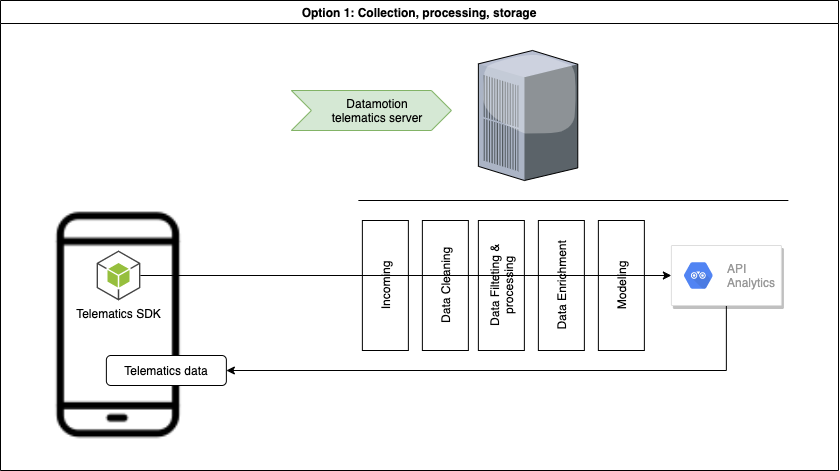 ## Collect, Process 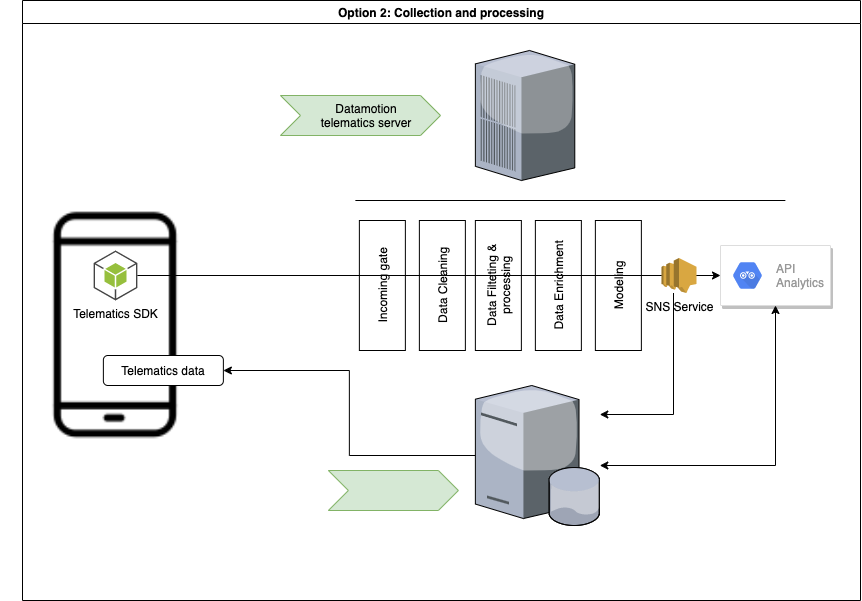 ## Collect 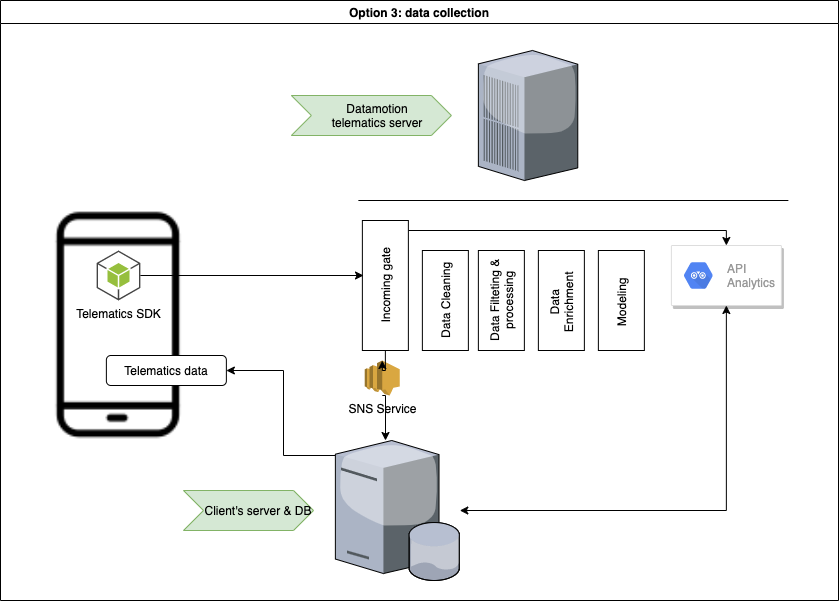 ***  # Common use-cases: * Safe and efficient driving * Usage-based insurance * Safe driving assessment * Driver assessment * Trip log * Geo-analysis * Accident monitoring * Driving engagements * Location based services * Realtime Tracking and beyond # How to start * Register a [SANDBOX ACCOUNT](https://userdatahub.com) * Get [CREDENTIALS](https://docs.userdatahub.com/sandbox/credentials) * Follow the guide from [DEVELOPER POERTAL](https://docs.telematicssdk.com) # Authentication To create a user on datamotion platform, you require to use InstanceID and InstanceKEY. You can get it in Datahub -> management -> user-service credentials Once you create a user, you will get Device token, JWT token and refresh token. then, you will use it for APIs
Listed from APIs.guru (CC0).